Display Similar Questions and Articles in the Customer Service
Template Search
Different Experience Cloud site users can ask similar questions. Chatter Questions
helps reduce duplicate content in self-service sites that are built on the Customer Service
template by showing similar questions and relevant Salesforce Knowledge articles. Potential
answers appear on a list as a user enters a question in the Search field.
Required Editions
| Available in: Salesforce Classic |
| Available in: Group, Professional, Enterprise,
Performance, Unlimited, Contact Manager, and Developer
Editions
|
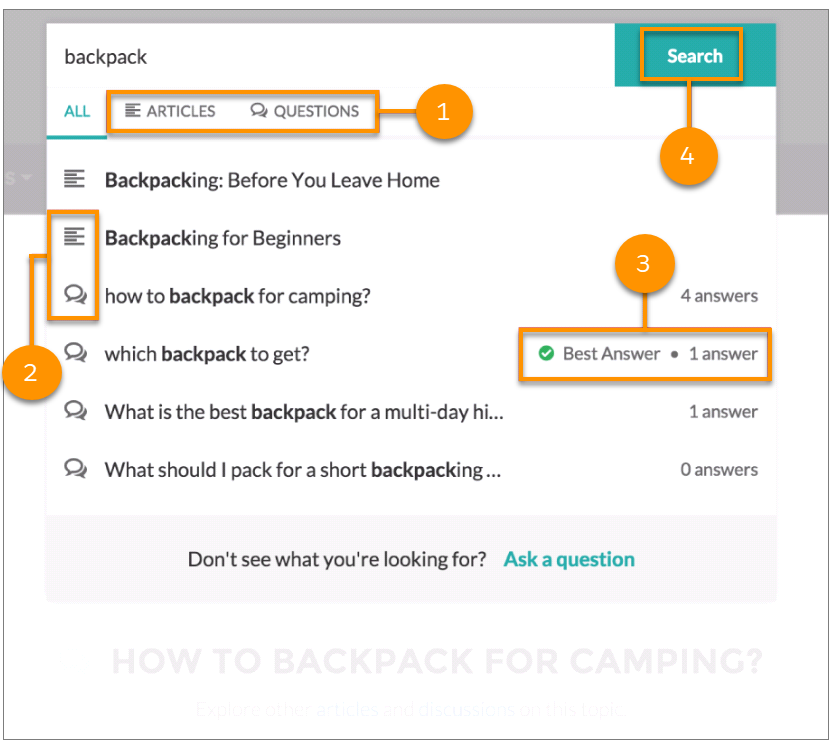
When a user enters a question in the Search field, similar questions and Knowledge articles
appear in a list below the field. The list contains two tabs: Articles
and Questions.
By default, each tab contains up to six results. The All tab shows
both matching articles and questions, with articles appearing first. It displays an equal
number of questions and articles. If there isn’t enough of one type of result, more results of
the other type are displayed to reach the maximum. To see results of a particular type, users
can click the Articles and Questions tabs. If a
search only returns one result type (for example, questions), users still see all the
tabs.
- 1: The Articles and Questions tabs let users
view results of each type. Users can use the Up and Down arrow keys to navigate between
results on any of the tabs. Clicking a question or article in the list navigates directly to
it.
- 2: Text and chat bubble icons indicate whether a search result is an article or a
question.
- 3: Questions in the list show the number of answers. If a question was answered, a green
checkmark with the text Best Answer appears next to it in the
list.
- 4: Search results are based on whether the question or article title contains the text
entered by the user. When the user performs a full search by clicking
Search, the search engine also scans question descriptions and
article text for matching terms.
To customize the search settings, edit the Search Publisher component in Experience
Builder.