
In Salesforce Classic, you can reduce duplicate content by showing similar questions and relevant Salesforce Knowledge articles. In Chatter, potential answers pop open as the user asks a question. In Experience Cloud sites with Chatter, question deflection features are available through Experience Builder components.
Required Editions
| Available in: Salesforce Classic |
| Chatter Questions is available in: Group, Professional, Developer, Performance, Enterprise, Contact Manager, and Unlimited Editions |

- Besides Salesforce Classic, question deflection is available in sites that are built on the Customer Service (Napili) template or built with Salesforce Tabs + Visualforce. For more information, select these components on an Experience Builder page, and view their properties Ask Button and Contact Support and Ask Buttons.
- Similar Questions and Similar Articles aren’t available in Lightning Experience or the Salesforce app.
When a user enters a question in Chatter, similar questions automatically appear in a list below the question title field. To show relevant Knowledge articles along with similar questions, enable Similar Articles.
List of similar questions and articles below the question title field:
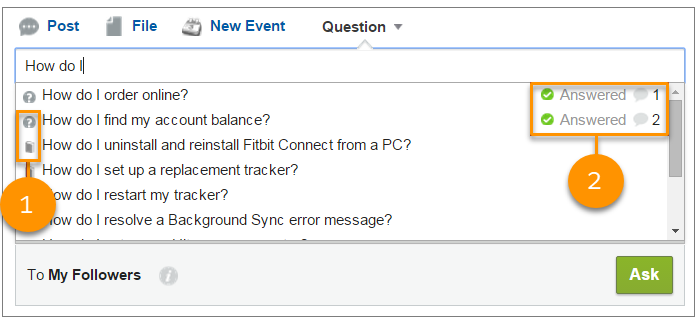
- 1: Book and question mark icons indicate whether a search result is an article or a question.
- 2: Question results show the question title, the number of answers, and a green flag with the text Answered when a best answer is selected.
Users see up to 10 results in the results list, with questions appearing before articles. Salesforce shows an equal number of questions and articles. But if there aren’t enough of one result type, extra results of the other type are shown. If no question or article title matches the text entered by the user, the results list doesn’t appear.
Results are based on whether the question or article title contains the text entered by the user. The search accounts for partially matching terms and non-adjacent terms. For example, the results for “best backpack” could include a question titled “Which backpack is best for day hikes?”, and the results for “backpack” could include an article titled “Backpacking Tips.”
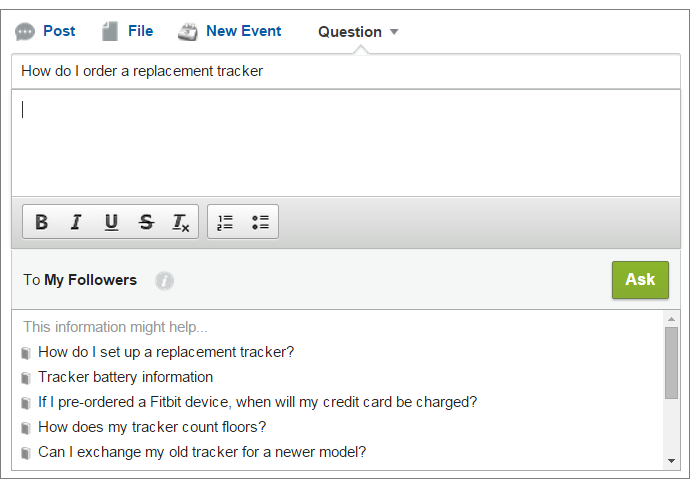
The user can conduct a search that also scans question descriptions and article text by pressing TAB or clicking out of the title field. Moving out of the title field causes a separate list of results to appear below the question publisher.
Advanced dropdown search results of similar questions and articles:
If no result answers the user’s question, they can post their question by clicking Ask.