
Set how often Data 360 refreshes a secondary index so that the index stays current with the underlying object. Choose a refresh frequency that keeps the index fresh enough for your queries without refreshing more often than your data changes.
Data 360 refreshes each secondary index on a schedule. Secondary index refreshes are incremental and only rebuild the portion of the index affected by changed data, which reduces refresh cost and data freshness lag.
You can set the refresh schedule when you create a secondary index, or update it later for an existing index. Because each refresh consumes credits, refreshing more frequently increases consumption. For more information, see Billing Considerations for Secondary Indexes.
-
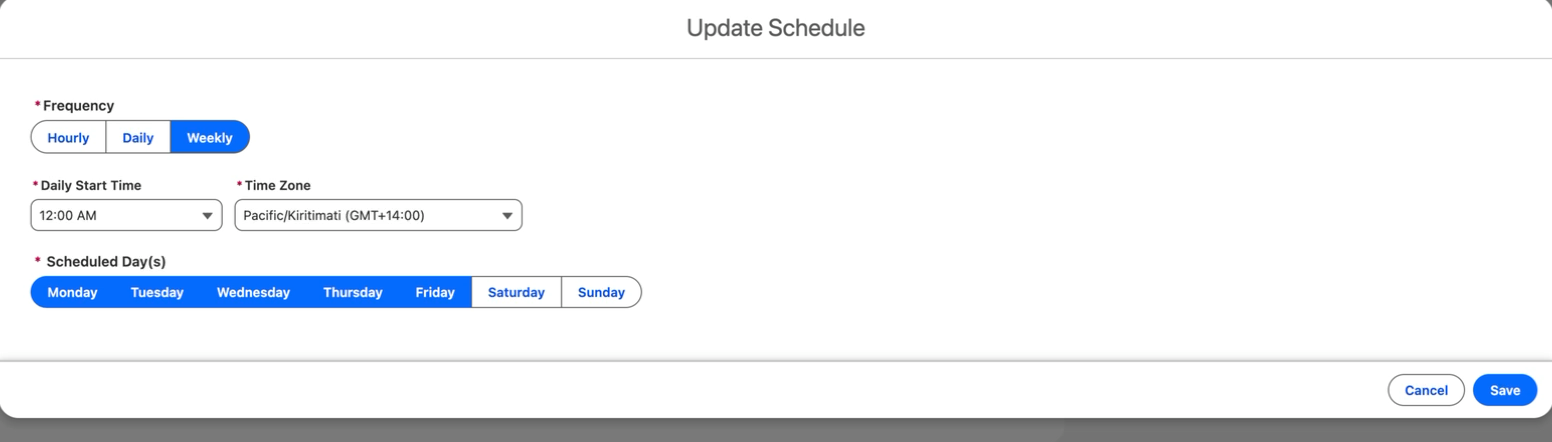
To update the schedule for an existing secondary index, open the index record and
choose Update Schedule.
-
For Frequency, choose how often the index refreshes:
Hourly, Daily, or
Weekly.
Secondary indexes work best on objects that update at most every 24 hours. For frequently updated objects, refreshing more often can increase cost without improving freshness. For best results, align your refresh schedule with your data update frequency.
- If you chose Hourly or Daily, set Run Every to the number of hours or days between refreshes.
- For Daily Start Time and Time Zone, choose when each refresh runs.
- If you chose Hourly or Weekly, select one or more days under Scheduled Day(s).
- Choose Save.
You can change the refresh schedule at any time. Changing the schedule doesn't rebuild the index immediately. The new schedule applies to the next refresh.