
The Salesforce Catalog is a unified registry that discovers, indexes, and connects metadata across Salesforce and its ecosystem. This semantically rich foundation powers intelligent automation, agents, and high accuracy natural language queries at scale.
Fragmented data leaves AI agents with low context. The catalog grounds AI in your unique business semantics, reducing hallucinations, and turning cryptic technical fields into actionable intelligence for high accuracy, production-grade autonomous AI.
Data 360 powers the Salesforce Catalog. Built natively for real-time AI systems, Data 360 ingests, transforms, maps, and indexes metadata for natural language queries.
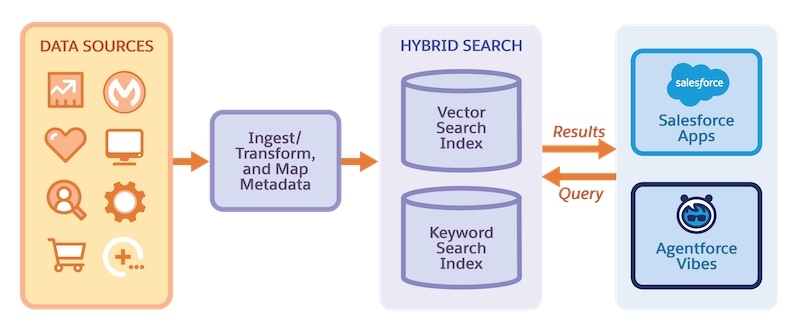
As part of the Salesforce Headless Toolkit initiative, the platform makes capabilities accessible through APIs, Model Context Protocol (MCP), or CLIs without a browser. Developers, admins, and agents use the catalog to access full org context, metadata, permissions, and business logic in one place.
By using the Salesforce hosted Metadata Grounding MCP server with AI agents, you can autonomously query, access, and interpret metadata in AI environments such as Agentforce Vibes. For more information on Metadata Grounding MCP Server, see Metadata Grounding MCP Server (Beta).
- Metadata Extraction and Refresh
The metadata extraction framework extracts standard and custom metadata from a Salesforce org. Data 360 stores the metadata in a metadata data lake object (mDLO). A metadata extraction pipeline monitors the metadata's lifecycle, extraction, and ingestion into the catalog. The extraction pipeline handles bulk (Day 0), incremental metadata ingestion, and refresh between the Salesforce org and Data 360. - Metadata Grounding Capabilities
With metadata grounding, you discover, understand, and reuse metadata through natural language interactions. Metadata grounding capabilities accelerate development and customization by making your Salesforce ecosystem accessible and actionable. - Turn On Salesforce Catalog
Make Your org's metadata available to AI agents with natural language queries by enabling Salesforce Catalog. - Salesforce Catalog Considerations
Note these considerations when you work with the Salesforce Catalog. - Troubleshoot Salesforce Catalog Errors
Diagnose and fix the most common issues when setting up Salesforce Catalog. - Billing Considerations for Salesforce Catalog
When you use Salesforce Catalog, you process unstructured data and search index configurations in Data 360. Use of Salesforce Catalog with Data 360 impacts the consumption of credits in these usage types.