
Create secondary indexes in Data 360 to improve query performance and reduce credit usage on data lake objects (DLOs) or materialized data model objects (DMOs) by optimizing data retrieval beyond primary key fields.
Required Editions
| Available in: All Editions supported by Data 360. See Data 360 edition availability. |
| User Permissions Needed | |
|---|---|
| To view secondary indexes |
One of these permission sets:
|
| To create or delete secondary indexes |
Permission set:
|
To create a secondary index on a DLO or DMO, you must have data space access to that object. For more information about data space aware objects, see Data Space Aware Objects and Features.
-
In Data Cloud, navigate to Secondary Indexes tab.
- From the App Launcher, find and select Data Cloud.
- Select the Secondary Indexes tab if it's available. Otherwise, choose More and select Secondary Indexes.
- Choose New on the Secondary Indexes page to open the New Secondary Index window.
-
Enter a Name for your new secondary index and optionally provide
a Description.
Ensure that the name of your secondary index is descriptive and provides context that it is an index. Secondary indexes are saved as a new DLO.
-
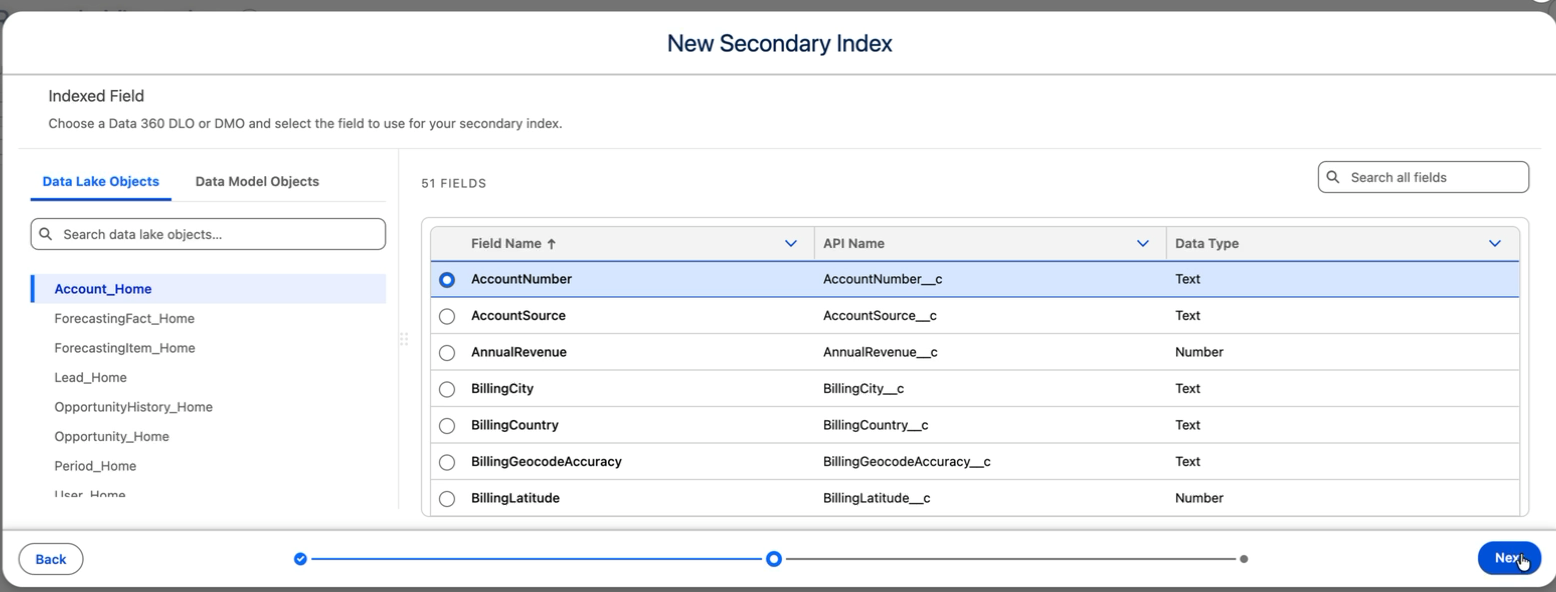
Search for and select the DLO or materialized DMO that you want to index.
Search by object name or browse available objects.
-
Choose the field to use for the secondary index, and then click
Next.
-
Set a refresh rate for your index, and then click Save.
Select a Frequency of Hourly, Daily, or Weekly, and set the Daily Start Time and Time Zone. For an hourly or daily refresh, set Run Every. For an hourly or weekly refresh, also select one or more Scheduled Day(s).

Note You can't edit secondary indexes after creation. To change a secondary index, delete
and recreate it. Recreating a secondary index incurs the cost of index creation. You
can change how often the index refreshes at any time. See Schedule a Secondary Index Refresh.