Learn more about how to submit Data Deletion requests in Data 360.
You can submit Data Deletion requests of individual data profiles in Data 360. All requests must be submitted using the Consent API.
A Data Deletion request deletes the specified individual's record from the Individual data model object (DMO) and the individual's related records from the DMOs that are directly related to the Individual DMO through the individual's ID, such as Contact Point Address, Contact Point Email, and Contact Point Phone. The request also deletes the individual's records from the data lake objects (DLOs) mapped to these DMOs and from related calculated insights.

Data deletion, while not processed immediately, typically occurs within hours. This time can increase based on the number of records that need to be deleted.
Deletion requests are reprocessed after 30, 60, and 90 days to delete any added data and to verify full deletion.
You must submit data deletion requests in every connected system and Salesforce cloud.

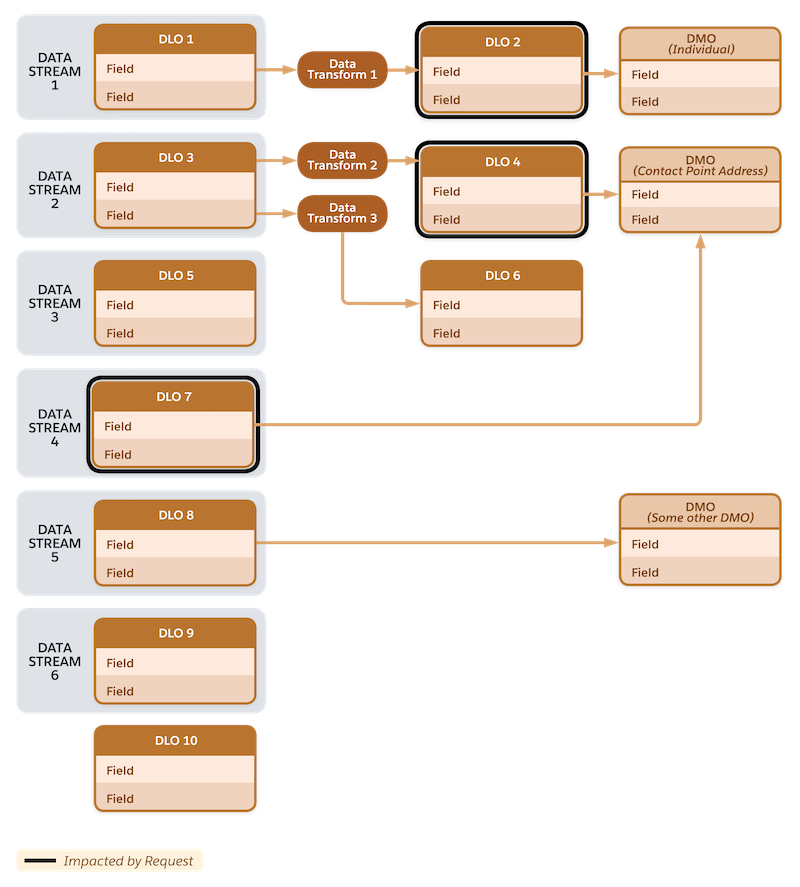
The example below shows the deletion behavior among many DLOs, wherein only specific ones
are impacted by the deletion request. For instance, matching records from DLO 2 are deleted
because it’s mapped directly to the Individual DMO, and matching records from DLO 4 and DLO
7 are deleted because they’re mapped to the Contact Point Address DMO. Matching records from
the other DLOs aren’t deleted because they’re not mapped to either the Individual DMO or the
Contact Point Address DMO.