
In a clean room collaboration, you and another party can run permitted queries on each other's data while keeping raw records private. The provider specifies which data to share, under what terms, using a collaboration template. Data 360 enforces appropriate privacy and security measures, and gives both parties full visibility into how their metadata is accessed and queried.
Required Editions
| Creating and distributing AppExchange clean room packages: Developer Edition |
| Deploying packages, creating collaborations, accepting invitations, and running queries: Enterprise Edition (home org) |
The standard clean room flow applies to use cases such as segment overlap that return query results to a DMO. Some use cases diverge from this flow: clean room activation, identity boost, and collaborations with an AWS Clean Rooms provider. See Use Case Variations.
In a clean room, you collaborate as a provider or as a consumer. To collaborate, both parties map their data to the clean room with the guidance of a collaboration template. The required and optional data fields are predefined in the template, along with the collaboration terms, such as the permitted queries, which party runs the queries, and which party receives the query results.
Data 360 clean rooms use data sharing between Data 360 orgs to securely associate metadata and support federated querying of configured datasets. If you don’t have your data in Data 360, ingest your data or use zero copy to associate your metadata to a clean room. When the collaborator runs a query in a clean room, Data 360 applies the required privacy measures to the data. Data 360 stores the query results—aggregated to preserve privacy—in data model objects (DMOs). Then, you create reports from them.
Standard Clean Room Use Case
Here’s the sequence of events for a standard clean room collaboration. For example, use this process to identify segment overlap.
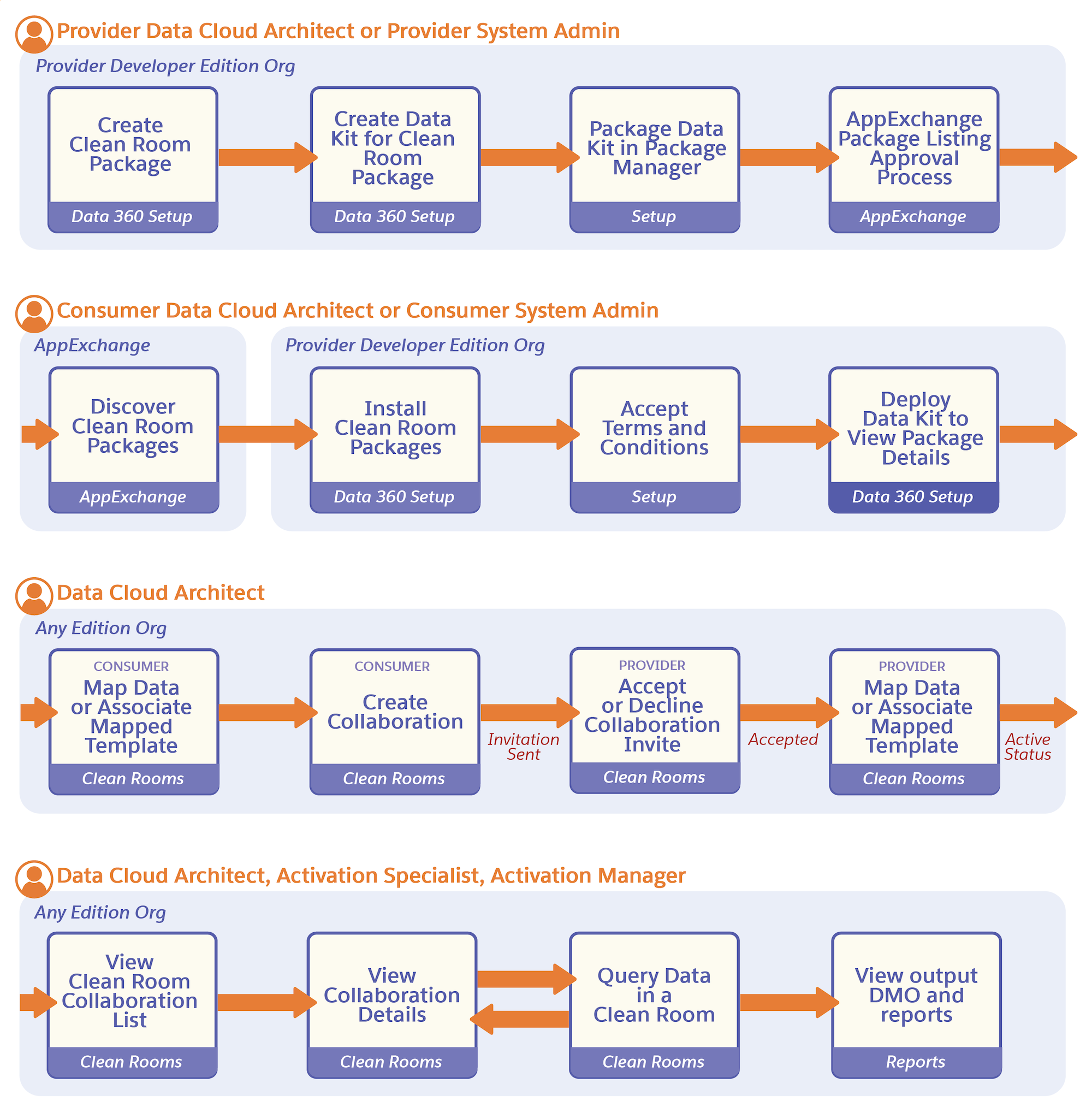

- Here's how to configure clean rooms in Data Cloud Setup:
- Provider: In a Developer Edition packaging org, create a clean room package. The package can contain a custom or Salesforce-provided collaboration template. A custom template can support multiple use cases.
- Provider: Publish the clean room package on AppExchange.
- Consumer: In an Enterprise Edition home org, deploy the package from AppExchange. If the provider is a trusted partner, you can also allowlist the provider to access supported use cases without deploying a package.
- Here's how to use clean rooms in the Clean Room tab in Data 360:
- Consumer and provider: In each party’s Enterprise Edition home org, create mappings between the attributes required for the use case and the corresponding attributes in each party’s dataset. Create mapped templates in advance, or map data while creating the collaboration or accepting the invitation. Both parties complete required mappings before the collaboration becomes active.
- Consumer: In an Enterprise Edition home org, create a collaboration for a specific use case, then save it. When you save the collaboration, the provider automatically receives an invitation.
- Provider: In an Enterprise Edition home org, accept the collaboration invitation. After you accept, the collaboration status changes to Active.
- Provider or consumer: Run queries on the combined dataset according to the roles and permissions defined for the use case in the collaboration template. Collaboration results are stored in a DMO or processed as defined in the collaboration template. Permitted parties can view the results and create reports from them.
Use Case Variations
Three use cases diverge from the standard clean room flow in specific ways.
- Clean room activation: When the provider accepts the invitation, they set up an AWS IAM role and trust policy, and configure the S3 bucket path so Data 360 can write results there. Instead of storing query results in a DMO, Data 360 writes the matched audience list directly to the provider's S3 bucket for activation in their demand-side platform. See Clean Room Activation.
- Identity boost: Before accepting the invitation, the provider completes required Snowflake setup. On acceptance, Data 360 tests the Snowflake connection automatically. The provider then enriches data in their own Snowflake account, not in a Data 360 org. There's no query step. After the provider runs the enrichment job, the enriched data becomes available to the consumer through the standard Data 360 activation flow, outside the clean room. The consumer shares PII in unhashed form and uses an identity boost package instead of a data collaboration package. See Identity Boost.
- AWS Clean Rooms provider: If your provider uses AWS Clean Rooms instead of Data 360, publishing the package is the provider's last action in Data 360. Every subsequent step, including accepting the invitation, happens in AWS Clean Rooms. See Collaborating with an AWS Clean Rooms Provider.
Aside from these differences, all clean room use cases follow the same package-and-collaboration structure: a provider creates and publishes a package, a consumer deploys it and maps data, the provider accepts the invitation, and either party runs queries.
- Clean Room Providers
Providers are publishers or companies that own a platform and can offer access to data or advertising space to other companies. Data 360 Clean Rooms enable providers to collaborate using Salesforce Data 360 clean rooms or AWS Clean Rooms. - Clean Room Consumers
Consumers are advertisers seeking insights from providers’ data to find appropriate audiences for their products. To initiate a clean room collaboration, deploy a clean room package from AppExchange, or allowlist a provider. If you allowlist a provider, you don’t need the clean room package to initiate a clean room collaboration. Use the Salesforce-provided collaboration template to initiate the collaboration. - Collaboration with an AWS Clean Rooms Provider
As a consumer using Data 360 clean rooms, you can initiate collaborations with a provider who uses AWS Clean Rooms. AWS-based providers use Data 360 once to create and publish the clean room package, then complete every other action in AWS Clean Rooms. Consumers manage their side of the collaboration entirely in Data 360.