
Use these aggregate, datetime, analytical, formatting, math and statistical, and boolean functions when you author calculated insights in Data 360. The Aggregatable column indicates whether a function's output can be rolled up across fewer dimensions when queried in segments or activations.
Required Editions

| Available in: All Editions supported by Data 360. See Data 360 edition availability. |
Aggregatable and Non-Aggregatable Metrics
Some functions produce metrics that can be rolled up or collapsed across dimensions. These are called aggregatable metrics. Functions such as SUM, COUNT, and AVG are examples of aggregatable metrics. You can query the result for any subset of the dimensions you defined when you created the insight.
Other functions produce non-aggregatable metrics. Functions such as RANK, NTILE, and CASE are examples of non-aggregatable metrics. Because the result depends on all the dimensions at once, you can't reduce or collapse the metric to a smaller set of dimensions. When you query a non-aggregatable metric, you must provide values for all the dimensions that were defined when you created the insight.
For example, if you create a metric called "Rank customers by total spend by product category and location" using the RANK function, you can't later query that rank for product category alone. When querying the metric, you must always specify both "Product Category" and "Location."
SELECT
  ssot__SalesOrder__dlm.ssot__SalesChannelId__c AS channel__c,
  RANK() OVER (ORDER BY SUM(ssot__SalesOrder__dlm.ssot__GrandTotalAmount__c) ASC) AS spend_rank__c,
  UnifiedIndividual__dlm.ssot__Id__c AS unified_individual__c
FROM
  ssot__SalesOrder__dlm
  JOIN IndividualIdentityLink__dlm
    ON ssot__SalesOrder__dlm.ssot__SoldToCustomerId__c = IndividualIdentityLink__dlm.SourceRecordId__c
  JOIN UnifiedIndividual__dlm
    ON IndividualIdentityLink__dlm.UnifiedRecordId__c = UnifiedIndividual__dlm.ssot__Id__c
GROUP BY
  unified_individual__c,
  channel__c
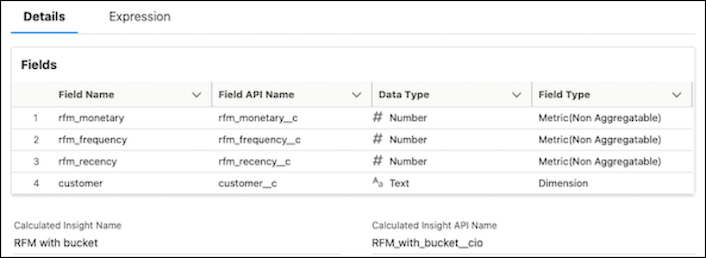
You can see whether a function produces a non-aggregatable metric in the object home screen of the Calculated Insights.
Aggregate Functions

| Function | Aggregatable | Description | Example |
|---|---|---|---|
SUM |
Y | Calculates the total by adding all values in the selected field. Supports numerical values. |
|
COUNT |
Y | Counts all values in the selected field. Supports date, text, and boolean measures. COUNT(*) isn't supported. |
|
AVG |
Y | Calculates the average of all the values in the selected field. Supports numerical values. |
|
MIN |
Y | Calculates the minimum value of the selected field. Supports numerical values. |
|
MAX |
Y | Calculates the maximum value of the selected field. Supports numerical values. |
|
MEAN |
Y | Calculates the average of the given dataset by dividing the total sum by the number of values in the dataset. |
|
FIRST |
Y | Returns the first value of the expression for a group of rows. |
|
LAST |
Y | Returns the last value of the expression for a group of rows. |
|
APPROX_COUNT_DISTINCT |
N | Returns the estimated cardinality by using the HyperLogLog++ algorithm, similar to COUNT DISTINCT. Use this function when you want to count unique occurrences of dimensions in a calculated insight. |
|
PERCENTILE |
N | Returns the exact percentile of the numeric column at the given percentage. The percentage must be from 0.0 through 1.0. |
|
STDDEV |
N | Returns the statistical standard deviation of all values in the specified expression. |
|
DateTime Functions
| Function | Aggregatable | Description | Example |
|---|---|---|---|
HOUR(TIMESTAMP) |
N | Returns the hour component of the string or timestamp. Return type: integer 0–23. |
|
DAY(DATE) |
N | Returns the day of the month of the date or timestamp. Return type: integer 1–31. |
|
MONTH(DATE) |
N | Returns the month component of the date or timestamp. Return type: integer 1–12. |
|
QUARTER(DATE) |
N | Returns the quarter of the year for the date. Return type: integer 1–4. |
|
YEAR(DATE) |
N | Returns the year component of the date or timestamp. Return type: integer. |
|
CDPHOUR(TIMESTAMP) |
N | Returns a timestamp representing the hour of the timestamp. Return type: timestamp. |
|
CDPDAY(DATE) |
N | Returns a timestamp representing the 0th hour of the day. Return type: timestamp. |
|
CDPMONTH(DATE) |
N | Returns a timestamp representing the month. Return type: timestamp. |
|
CDPQUARTER(DATE) |
N | Returns a timestamp representing the first day of the quarter. Return type: timestamp. |
|
CDPYEAR(DATE) |
N | Returns a timestamp representing the first day of the year. Return type: timestamp. |
|
CURRENT_DATE |
N | Returns the current date at the start of query evaluation. All CURRENT_DATE calls within the same query return the same value. |
|
DATE_SUB |
N | Subtracts a number of days from the date value and returns the earlier date. |
|
DATE_ADD |
N | Adds a number of days to the date value and returns the later date. |
|
DATEDIFF |
N | Returns the number of days from the start date to the end date. |
|
MONTHS_BETWEEN |
N | Returns the number of months between two dates. |
|
DAYOFWEEK |
N | Returns the day of the week for a date or timestamp (1 = Sunday, 2 = Monday, ..., 7 = Saturday). |
|
DAYOFMONTH |
N | Returns the day of the month of the date or timestamp. |
|
DAYOFYEAR |
N | Returns the day of the year of the date or timestamp. |
|
TO_DATE |
N | Parses the date string with the format expression to a date. Returns null if the input isn't valid. |
|
TO_TIMESTAMP |
N | Parses the timestamp string with the format expression to a timestamp. Returns null if the input isn't valid. |
|
DATE_TRUNC |
N | Returns the timestamp truncated to the unit specified by the format model. |
|
HOUR_ADD |
N | Adds a number of hours to the datetime value and returns the later datetime. |
|
HOUR_SUB |
N | Subtracts a number of hours from the datetime value and returns the earlier datetime. |
|
NOW |
N | Returns the current date and time aligned to when the insight is processed. All NOW calls within the same query return the same value. Time is calculated at millisecond precision in UTC for your instance's region. |
|
SECOND_ADD |
N | Adds a number of seconds to a datetime value and returns the later datetime. |
|
SECOND_SUB |
N | Subtracts a number of seconds from a datetime value and returns the earlier datetime. For example, use this function to include records from the last 5 minutes at the time of batch processing. |
|
Analytical Functions
| Function | Aggregatable | Description | Example |
|---|---|---|---|
LAG |
N | Returns the input value at the offset row before the current row in the window. The default offset is 1. Returns null if the input value at the offset row is null. |
|
LEAD |
N | Returns the value at the offset row after the current row in the window. The default offset is 1. Returns null if there's no offset row. |
|
NTILE |
N | Divides the rows for each window partition into n buckets ranging from 1 to at most n. |
|
RANK |
N | Computes the rank of a value in a group of values. The result is 1 plus the number of rows preceding the current row in the ordering of the partition. Produces gaps in the sequence. |
|
PERCENT_RANK |
N | Computes the percentage ranking of a value in a group of values. |
|
DENSE_RANK |
N | Computes the rank of a value in a group of values. Unlike RANK, doesn't produce gaps in the ranking sequence. |
|
ROW_NUMBER |
N | Assigns a unique, sequential number to each row starting with 1, based on the ordering of rows within the window partition. |
|
FIRST_VALUE |
N | Returns the first value of the expression for each row in the window. |
|
LAST_VALUE |
N | Returns the last value of the expression for each row in the window. |
|
REGEXP |
N | Searches strings for patterns in text. |
|
REGEXP_EXTRACT |
N | Creates dimension values by extracting them from a source dimension using Google RE2 regular expressions. |
|
REGEXP_REPLACE |
N | Extends REPLACE by letting you search a string for a regular expression pattern. |
|
ISNULL |
N | Returns true if the expression is null; otherwise, returns false. |
|
ISNOTNULL |
N | Returns true if the expression isn't null; otherwise, returns false. |
|
IFNULL |
N | Returns the second argument if the first argument is null; otherwise, returns the first argument. |
|
NULLIF |
N | Returns null if the two expressions are equal; otherwise, returns the first expression. |
|
CONTAINS |
N | Searches for a word or phrase in one or more text columns using precise or fuzzy matching. |
|
LIKE |
N | Searches for a specific pattern in a string value. |
|
RLIKE |
N | Searches a string for a regular expression pattern. |
|
NOTLIKE |
N | Ignores values that match the specified pattern in the column. |
|
NOTRLIKE |
N | Ignores values that match a regular expression pattern in the column. |
|
CASE |
N | Evaluates conditions and returns a value when the first condition is met. If no conditions are true, the ELSE value is returned (or null if there's no ELSE clause). |
|
Formatting Functions
| Function | Aggregatable | Description | Example |
|---|---|---|---|
SUBSTRING |
N | Extracts a substring from a string. Accepts a start index and a length. |
|
SUBSTR |
N | Extracts a substring from a string. Accepts a start position and a character count. |
|
RTRIM |
N | Removes trailing space characters from a string. |
|
UPPER |
N | Converts lowercase characters to uppercase. |
|
LOWER |
N | Converts uppercase characters to lowercase. |
|
CONCAT |
N | Returns a string by merging the values of specified fields and input strings. |
|
Math and Statistical Functions
| Function | Aggregatable | Description | Example |
|---|---|---|---|
MOD |
N | Returns the remainder after expr1 / expr2. |
|
ABS |
N | Calculates the absolute value of a number (the value without its sign). |
|
RAND |
N | Returns a random decimal number in [0, 1). Non-deterministic in the general case. Specify a seed to return a repeatable sequence. |
|
ROUND |
N | Rounds a number to the specified number of decimal places. |
|
GREATEST |
N | Returns the greatest value in the argument list, skipping null values. |
|
LEAST |
N | Returns the smallest value in the argument list, skipping null values. |
|
LOG |
N | Returns the logarithm of a number in a specified base. Arguments:
base (the base of the logarithm) and number (the
value to take the logarithm of).
|
|
EXP |
N | Returns e raised to the power of the specified number. |
|
BETWEEN |
N | Selects values within a given range (inclusive). Values can be numbers, text, or dates. |
|
Boolean Functions
| Function | Aggregatable | Description | Example |
|---|---|---|---|
IS_TRUE |
N | Returns true if the value is true. |
|
IS_FALSE |
N | Returns true if the value is false. |
|
HAS_BOOLEAN_VALUE |
N | Returns true if the field contains a value; returns false if it's null or blank. |
|
HAS_NO_BOOLEAN_VALUE |
N | Returns true if the field's value is null or blank; returns false if it contains a value. |
|