The Bring Your Own Large Language Model (BYOLLM) capability enables you to add a
foundation model hosted on an external platform and connect it with AI Models (formerly Einstein Studio). You can use
the foundation model to create a model configuration to power your generative AI. Evaluate the
model’s response to your prompts in Model Playground with different settings before you deploy the
model to production.
Required Editions
| Einstein generative AI is available in Lightning Experience. Setup for Einstein
generative AI is available in Lightning Experience. |
| Available in: Enterprise, Performance, and Unlimited Editions with
an Einstein for Sales, Einstein for Platform, or Einstein for Service add-on. To purchase the
Einstein for Sales, Einstein for Platform, or Einstein for Service add-on, contact your
Salesforce account executive. |
- Add a Foundation Model
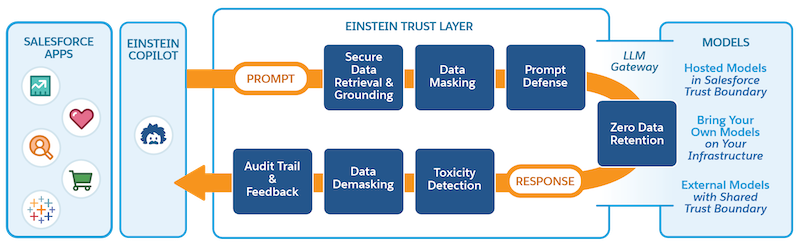
Adding a foundation model in AI Models (formerly Einstein Studio) establishes an endpoint connection between the external model provider and Salesforce. After you connect the model, create a new model configuration and evaluate your model’s response to custom prompts.
- Edit or Delete a Foundation Model
You can edit most of your foundation model settings as long as the model isn’t a source for other models. If it’s used as a source, you must first delete all associated model configurations. You can delete a foundation model if it’s no longer needed.
- Monitor Model Activity
View your model inference use and errors in a dashboard. Use important indicators to help you track, adjust, and improve model performance.
