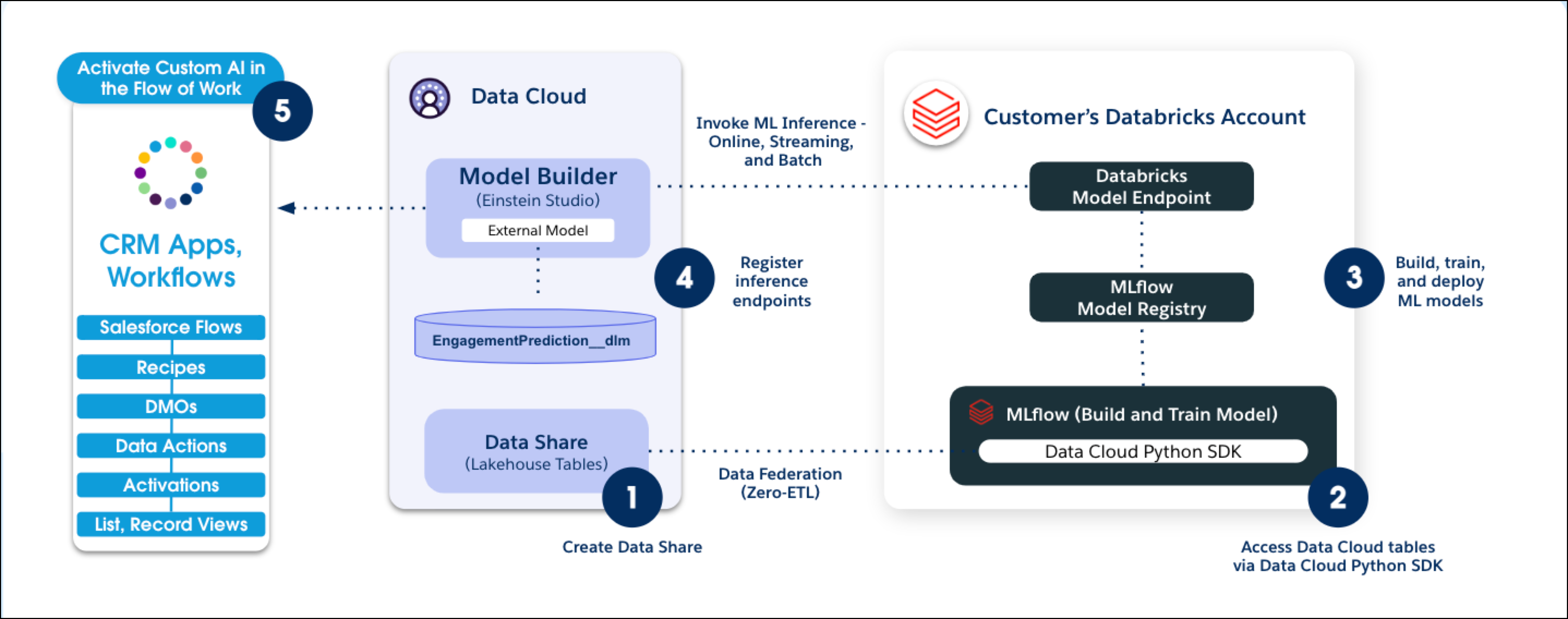
You can build, train, and deploy custom machine learning models with Databricks and data
in Salesforce. After registering a model in Databricks, define your prediction criteria and
connect the model with Data 360 to get predictions and insights for your use
case. Use the insights to enrich customer profiles, create segments, and personalize experiences
across various channels.
Required Editions
| Available in: Developer, Enterprise, Performance, and
Unlimited editions
|
Here are some benefits of using a Databricks model with Salesforce data.
- Access highly curated, harmonized, and near real-time data across Customer 360. This
capability leads to expert models that deliver more intelligent predictions.
- Build models in Databricks and easily connect them with Data 360 to consume
predictive insights for business process optimization and drive value. Use cases include
propensity to buy, lead conversion, propensity to churn, and more.
- Operationalize models and inferences easily in Salesforce.Data 360
simplifies the consumption of results from business processes and drives value.
- Eliminate tedious, costly, and error-prone Extract, Transform, and Load (ETL) jobs from
Databricks using a zero-copy approach to data. This approach reduces costs and improves
efficiencies.
- Integrate Vertex AI models and get predictions in Salesforce. Use Flow, a workflow automation
suite, to enable AI-driven decision-making that can evolve based on real-time updates to
data.
To use a Databricks model with Salesforce:
- Access your Data 360 data in Databricks to build, train, and deploy a
model.
- Connect your Databricks model with Data 360 to consume the inferences for
predictions and insights in various workflows across Salesforce.
- Set Up Your Data in Databricks
Access Salesforce data in your Databricks notebook using a Python connector. The user-friendly interface lets you quickly execute queries against data in Data 360 so that you can extract the data that you need into Python.
- Set Up an Endpoint in Databricks
Control the access to your data by setting up an endpoint connection between Databricks and Data 360.
- Connect a Databricks Model
To consume predictions in Salesforce, connect your Databricks model with Data 360 and define the prediction criteria for your use case.