
Build summary for Modern POS version 9.2.1, including what new features and changes it contains.
Overview of All Features
| Theme | Feature |
|---|---|
| Core Platform | Speech Recognition [Beta] |
| EJ/TLog/JSON Export | Not on File Metadata Enhancements |
| EJ/TLog/JSON Export | Bank Deposit and Store Close Business Date |
| Integrations | Adyen Terminal Terms and Conditions |
| Promotions | SUPC API Method Support |
| Inventory | Webhook for Sale and Refund Inventory Events |
| Returns/Refunds/Exchanges | Default Tender for NRR |
Core Platform
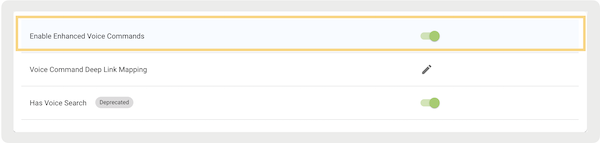
Enhanced Voice Command in POS App
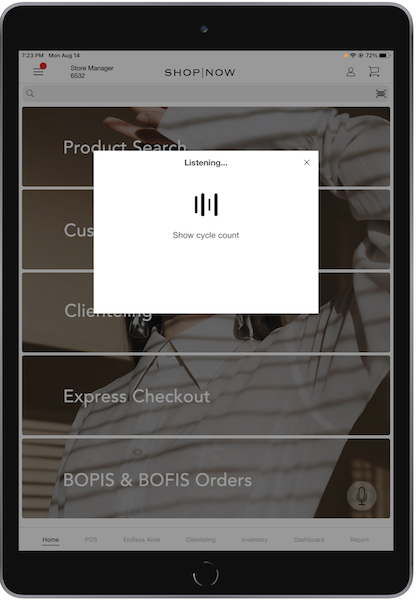
What it does: Voice recognition can now be used to go to 40 different deep links and perform product and customer search in the POS app. Point of Sale uses Speechkit and NLP framework for speech recognition in the POS app. For instance, the voice command "" displays the cycle count history on the app. This feature can improve efficiency, turn on hands-free operation, and enhance accessibility for users with disabilities.

How to configure:
What Looks Like:
Learn More: Speech Recognition
EJ/TLog/JSON Export
Not on File Metadata Enhancements
What it does: For app builds 9.3.1 and newer, the layout has been enhanced with three optional fields: , , and . On the layout, the associate can either enter the SKU number or scan the bar code. determines if the Not-on File product inherits the tax class set in the "" or "" store settings.
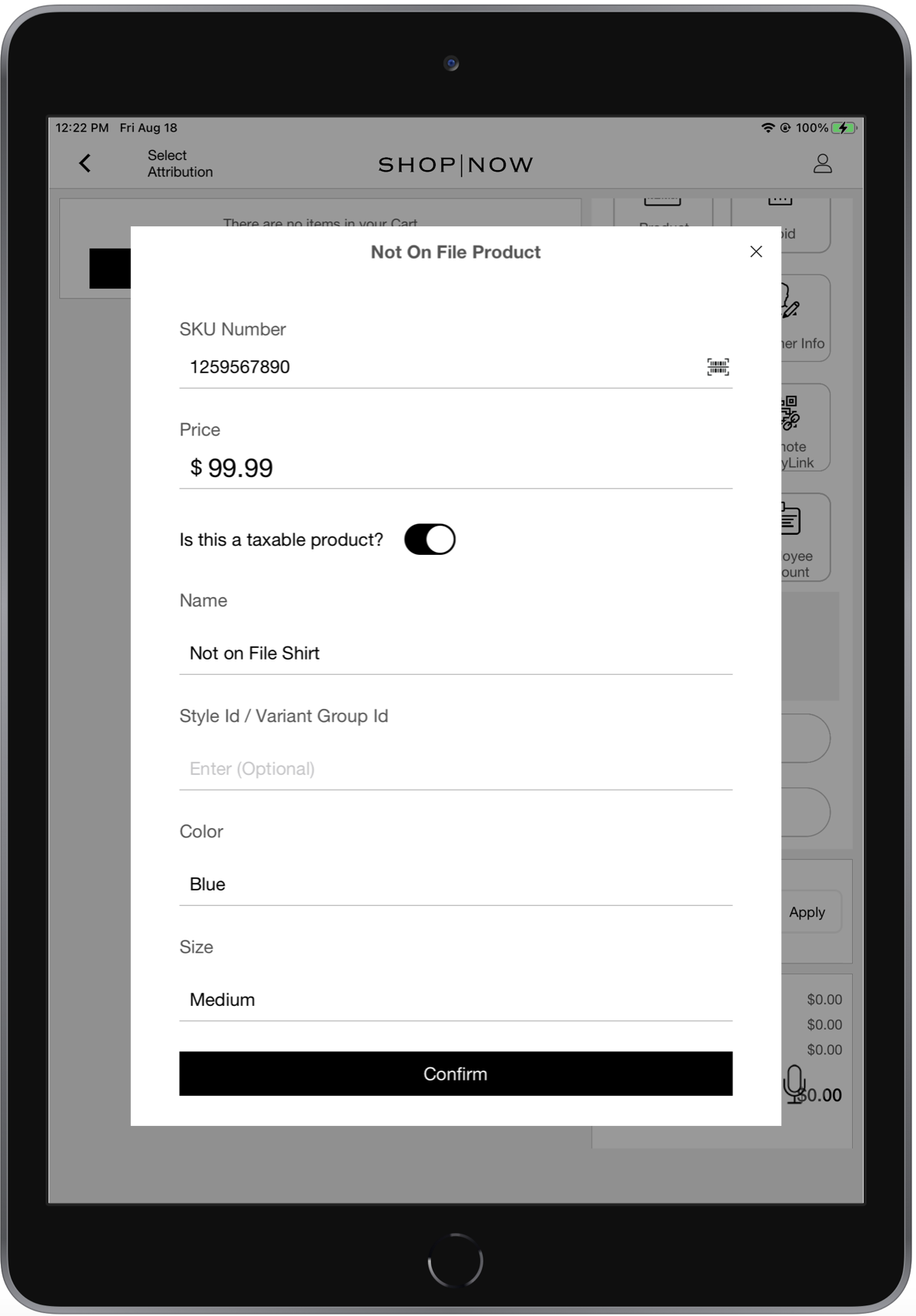
How to turn on Not-on File functionality:
- Go to .
- Turn on .
- Save your changes.
- Go to .
- Add the tax class under "".
- Add the zero tax class under "".
- Save your changes.
- Configure ability to add a Not on File product to the cart:
- Edit the app configuration that has the Not on File form.
- Go to .
- Under , select the pencil to the right.
- Create or select a cell.
- On the right toolbar menu, select .
- Set the deep link and save the changes.
Learn More: Product Not on File Report
Bank Deposit and Store Close Business Date
What it does: Provides a record of the actual Business Date of a Bank deposit and a Store Close in the Electronic Journal (in the event you perform a bank deposit after store close).
Learn More: Opening and Closing a Store for the Day
Integrations
New Field Type: Adyen Terminal, Accept Terms and Conditions
What it does: You can ask and track a user's information, like agreeing to terms and conditions, on the Adyen terminal with a layout field type.
How to configure:
- Create a layout, customize a prebuilt layout, or edit an existing layout to turn on Terminal Input.
- Add and configure the elements you want to obtain terminal input for. We have a new
field type, "".
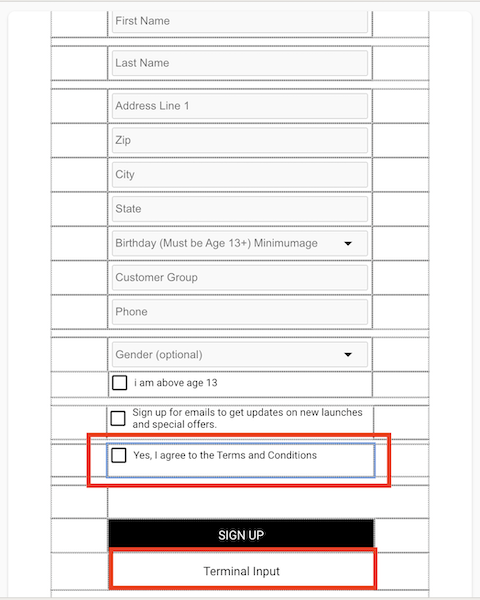
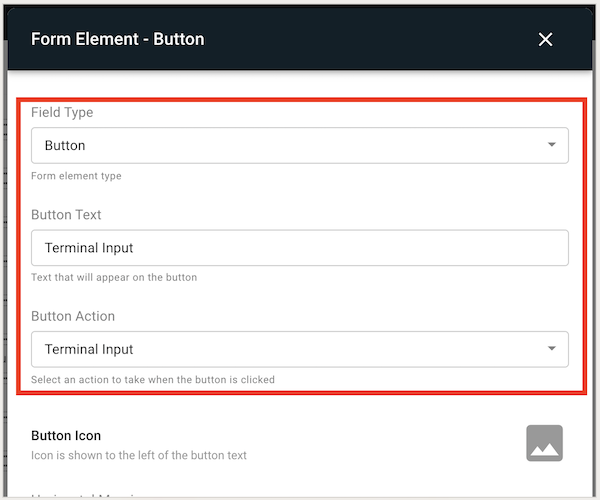
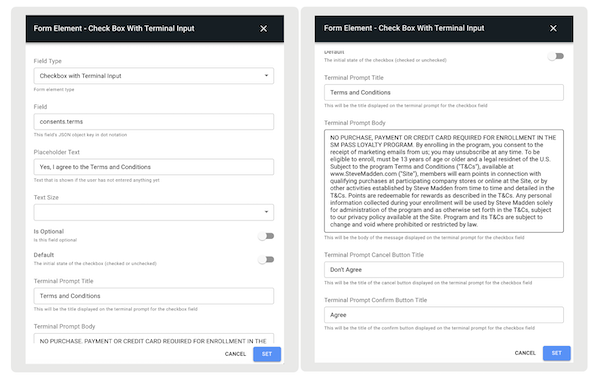
- Customize your form elements the way you want them.
- consents.terms =
- consents.policy =
Learn More: Capture Customer Information From Payment Terminal
Promotions
Single-Use Promo Codes: API Support
What it does: Single-Use Promo Codes (SUPCs) can be uploaded and accessed in three ways: manual, CSV, scheduled feed, and now through an API. With an API, SUPCs can be fetched, updated, and uploaded to Salesforce, even including expired codes. For promotions exclusively tied to SUPCs, create them. The purpose here is to extract data from the promotion, gaining insight into the included codes and their redemption status. Use this API function to add SUPC codes to the promotion. You can update these promo codes within the same promotion.
Learn More: Promotions and API
Inventory
Webhook for Sale and Refund Inventory Events
What it does: Ability to trigger an inventory adjustment if there's a sale or a return.
How to configure: https://labs.predictspring.com/cms/custom-api/create/new
= This event indicates that an item (or items) has been sold. If this event is triggered, the expectation is that the inventory for the specified item(s) decreases.
= This event indicates that an item (or items) has been returned or exchanged. If this event is triggered, the inventory for the specific item(s) increases or adjusts in some manner if it's an exchange.
Learn More: Promotion Management in the API, SPI, and Webhook Specs
Returns/Refunds/Exchanges
Default Tender for No Profile, No Card, No Receipt Return
What it does: Ability to set a preferred tender type for the sale portion of the exchange in a No-Receipt Return (NRR) flow. This tender is used as the first tender for the part of the exchange that is bought with returned items because there's no value for an NRR. Any portion of an uneven exchange that requires additional tendering will report the actual tender values used.
The returns and exchanges that inherit the configured default tender as part of No Receipt Returns are listed:
- Returning an item or multiple items (that is, a pure return)
- Returning item(s) along with a purchase where a customer still gets a refund
- Returning item(s) along with a purchase where a customer makes a payment
- Exchanging (even exchange) an item or multiple items
- Exchanging (even exchange) item(s) with purchase
How to configure: https://labs.predictspring.com/cms/stores/return-policy-config
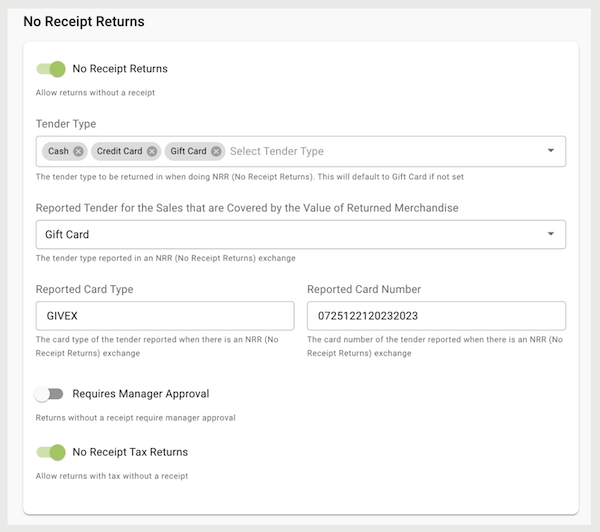
- Create a return policy (or edit your existing one).
- Under , go to .
- Turn on .
- Configure the tender type you want as your refund .
- Turn on if manager login is needed before completing No Receipt Returns in the POS app.
- Turn on to calculate tax returns for products that are returned within the POS app.
Learn More: No Profile, No Card, No Receipt Returns (NRR)
Other Feature Enhancements
| Title | Description | Help Center Link |
|---|---|---|
| Verifone Payments - Receipt Display | Enhanced integration with Verifone, enabling your customer to view their full receipt on the terminal. | Verifone - Line Item Display |
| Optional Cash Rounding - w flag in NL | Parity in features for international, ability to have optional cash rounding with a switch to the Netherlands. | NA |