
Build summary for Modern POS version 10.0.1, including what new features and changes it contains
Overview of all Features
| Theme | Feature | Benefit |
|---|---|---|
| Core POS | Price Levels Page in CMS | New page in CMS that allows you to see all levels of pricing by Product ID |
| Core POS | Punchout: using External Service from POS | Ability to use an external service from the POS in the event you want to pass customer information or products into the POS. Reach out to your Customer Success Manager (CSM) for more details if this is something you're interested in. |
| Core POS | Copy Special Order Product in Cart | Enables you to seamlessly create multiple special product orders for custom products with similar attributes instead of having to start from scratch for each one. |
| SPI | Delivery Date Picker SPI | New SPI that allows you to provide delivery dates for products by line in cart |
| Payments | Verifone Remote and In-Store Pay by Link | Remote and In-Store Pay by Link now available through Verifone, allowing you to transact with the customer seamlessly and meet them where they are. |
| Deprecation | Native Point of Sale Tax Engine | As of 2025, support for the Native Tax Engine has been discontinued. Originally designed as a back-up tax solution and not a primary tax engine, the Native Tax Engine is no longer supported with technical updates or maintenance for any new or existing customers. To ensure uninterrupted business operations, all customers still using the Native Tax Engine must migrate to an alternative solution immediately. |
| Other Feature Enhancements | Various | Various |
Core POS
Price Levels Page in CMS
What it does: New page in CMS that allows you to see all levels of pricing by Product ID.
How to access: CMS Link
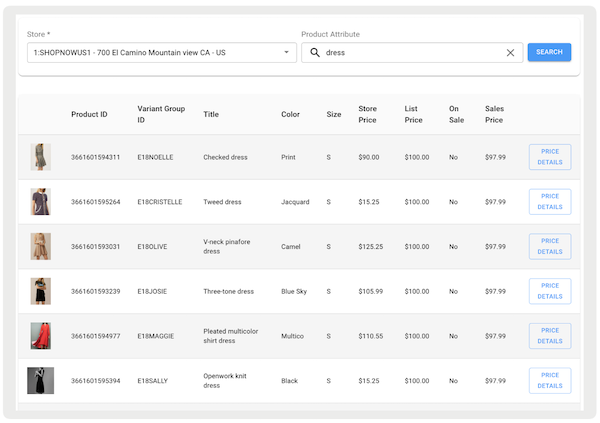
You can view detailed pricing for each product by selecting . This opens a new window displaying both the product information and the available prices at the product and store levels.
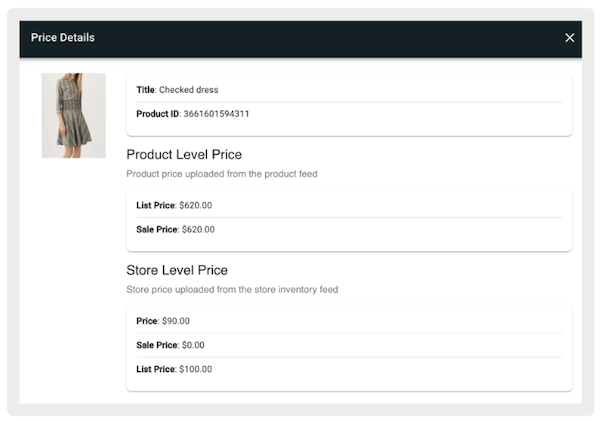
Learn More: Price Lookup Report
PunchOut: Use External Service from POS
What it does: provides the ability to use an external service to pass things like customer information or products into a POS.
The flow works as follows: If a command starts on the web page, it sends data back to the POS app. For example, this can involve logging in as a customer or adding products to the cart. The POS app recognizes the data via the payload sent if the command starts. Other actions, such as navigating to the cart within the POS app, can also be managed this way.
Reach out to your CSM for more details if this is something you're interested in.
Learn More: Supporting PunchOut Webpages on POS App
Copy Special Order Product in Cart
What it does: easily make many special product orders for custom products with similar features instead of having to start from scratch for each one.
Learn More: Copying Special Forms on POS App
SPI
Delivery Date Picker
What it does: With Salesforce's SPI, merchants can integrate to support retrieving delivery or pickup dates on the POS app. The POS app calls the SPI, asking for a list of available dates. It also includes details like cart products, how they are shipped, shipping addresses (if turned on), and addresses for each item that needs to be shipped. The response provides an array of dates or an error message to be shown in the POS. Delivery and pick-up dates can be set at the order level or for individual items in the cart.
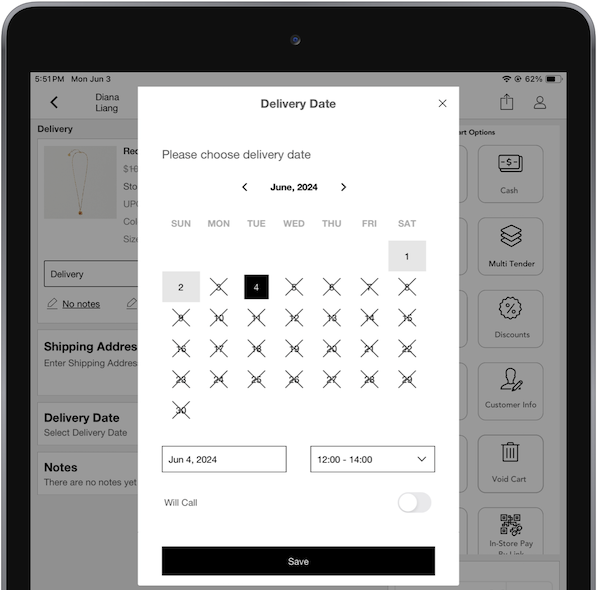
How to configure SPI: CMS Link
- In CMS, go to .
- Create an integration by selecting .
- Under , select "".
- Under , select "".
- Under , enter the URL endpoint.
- Under , select "".
- Under , enter headers to be passed.
- Save your changes.
Learn More: Retrieving Delivery & Pickup Dates via SPI
Payments
Verifone Remote and In-Store Pay by Link
What it does: Verifone now offers Remote and In-Store Pay by Link. Work with customers from anywhere and meet them where they are.
How to configure: CMS Link
- In CMS, go to .
- Edit the VerifonePSDK Payment Gateway.
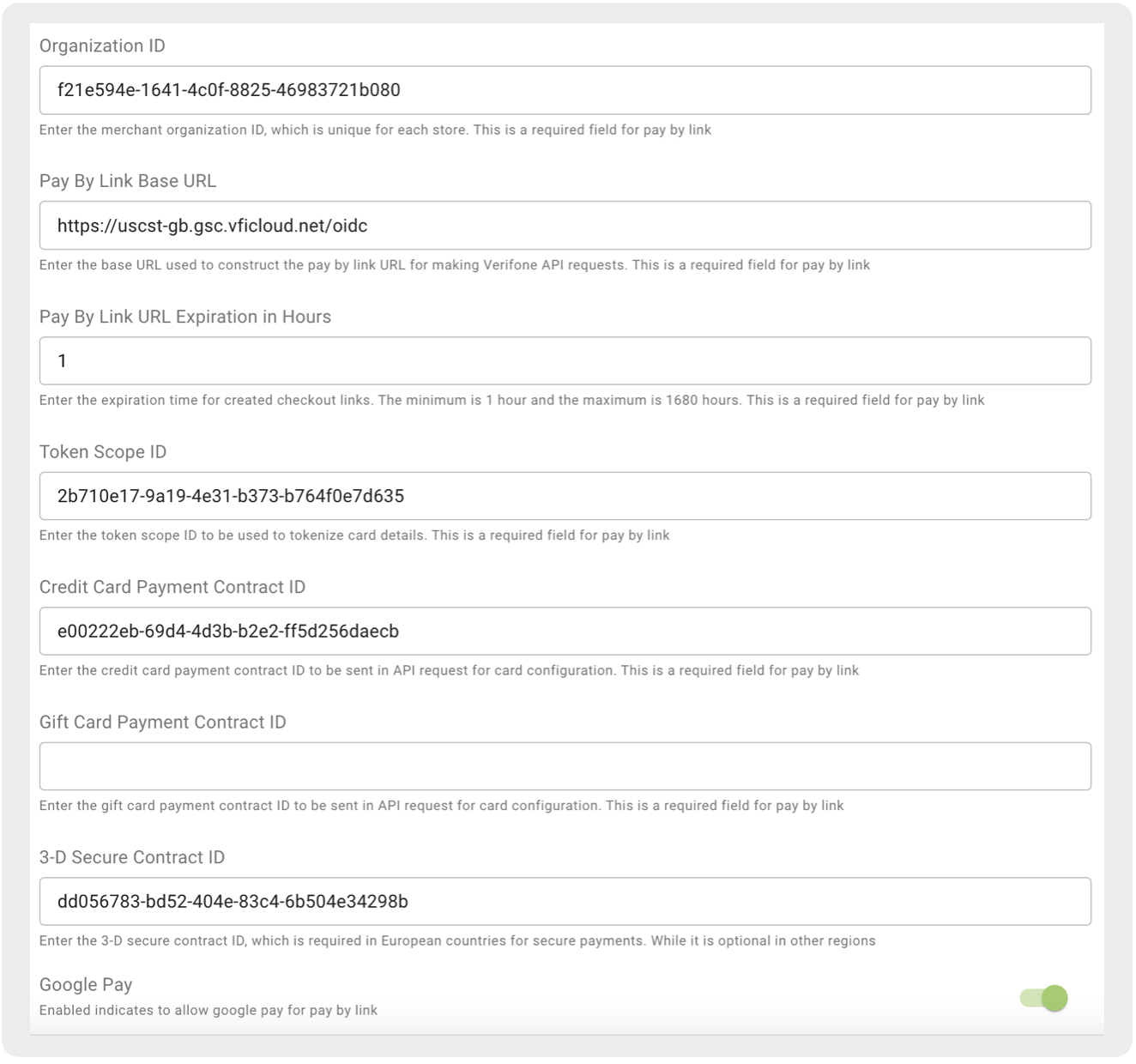
- Go to and configure the fields:
- : Enter the merchant organization ID, which is unique for each store. This value can be found in your Verifone portal by going to "". Select the company or organization's site from a table list and copy the "Organization ID".
- : Enter the base URL used to construct the Pay by Link URL for making Verifone API requests. Details can be found at this link.
- : Enter the expiration time for created checkout links. The minimum is one hour and the maximum is 1680 hours.
- : Enter the token scope ID to be used to tokenize card details. This value can be found in your Verifone portal by going to "". Select the company or organization's site from a table list and copy the "Token Scope". Note, this value can only be found if an admin user is logged in.
- : Enter the credit card payment contract ID to be sent in API request for card configuration. This value can be found in your Verifone portal by going to "". Edit a contract and go to "".
- : Enter the gift card payment contract ID to be sent in API request for card configuration. This value can be found in your Verifone portal by going to "". Edit a contract and go to "".
- : Enter the 3-D Secure Contract ID, which is needed to secure payments in European countries where it is mandated. This field is optional for all other regions. This value can be found in your Verifone portal by going to "". Select the company or organization's site from a table list and copy the "3-D Secure Contract ID".
- : If enabled, Google Pay can be used for PBL.
- : If enabled, Apple Pay can be used for PBL.
- Go to Connectivity and Authentication and configure the fields:
- : Enter user ID to be used in API request for authentication. This user ID is the admin of the merchant site organization for which pay-by links are created. This value can be found in your Verifone portal, select under , and select the first four letters of the API Key from the list. Copy the User ID.
- : Used in API request for authentication and created from the user ID in Verifone portal. This value can be found if creating a new API key. Copy and save the key as closing the dialogue after creating the key doesn't fully show the key again.
Learn More: Pay by Link (PBL) Overview
Other Feature Enhancements
| Title | Description | Help Center Link |
|---|---|---|
| Tipping on Returns | If you accept tips, we now show the tip information on the return screen. This makes it easier to see and track the amount of tips that are returned on an order. | Support Tipping on Adyen Terminals |
| France Fiscalization 2024 Certification | Completed our annual fiscalization certification for France | Fiscalization |