Confirm the accuracy of financial data and identify inconsistencies among the Retail Cloud order amount, the amount requested to the payment gateway, and the amount collected by a processor.
Access the Report
- Go to .
- Filter the search by specifying the tender type, transaction type, and date or time. Optionally, the results can be grouped by tender type or dates under .
-
Select .
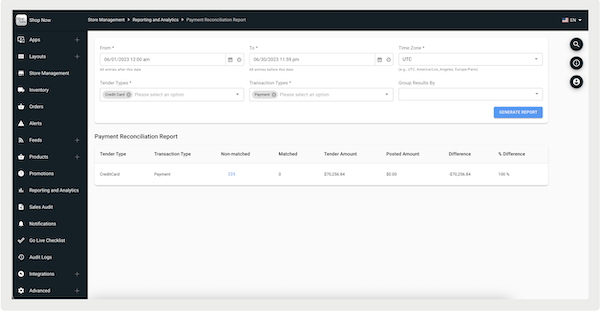
See the table descriptions below:
| Column | Description |
|---|---|
| Tender Type | Tender used to complete a transaction (for example, credit card) |
| Transaction Type | Type of completed transaction (for example, Payment) |
| Nonmatched | Number of transactions where there's any mismatch among order amount, posted amount, and processor |
| Matched | Number of transactions where there's a match among order amount, posted amount, and processor |
| Tender Amount | Total amount expected to be collected for Sale |
| Posted Amount | Total amount requested by Point of Sale to the gateway |
| Difference | Calculated as "Tender - Posted" |
| % Difference | Calculated as "Difference / (max(Tender, Posted))" |
Non-matched Transactions
Identify differences in transactions.
In the case of transactions that aren't matched, the report shows and highlights these
transactions. These transactions are if there's a difference among the order amount, posted
amount, and processor. 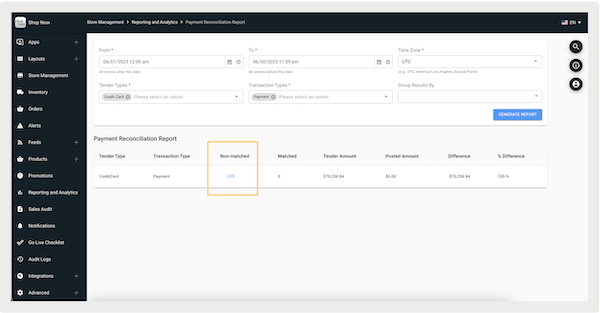
By clicking on the transactions, you'll go to a screen where the unmatched transactions are
organized based on the type of difference. These categories include "Amounts Mismatched",
"Tender Amount Missing", and "Posted Amount Missing".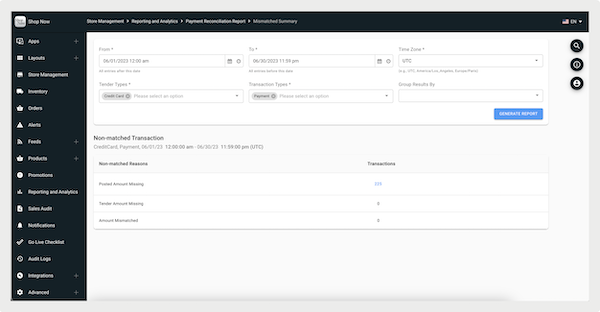
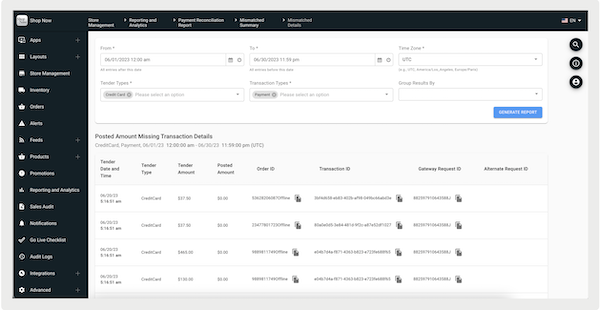
The reasons can be clicked into, where you'll be directed to a screen that shows details of
the discrepancies, including tender type, tender amount, and posted amount.