
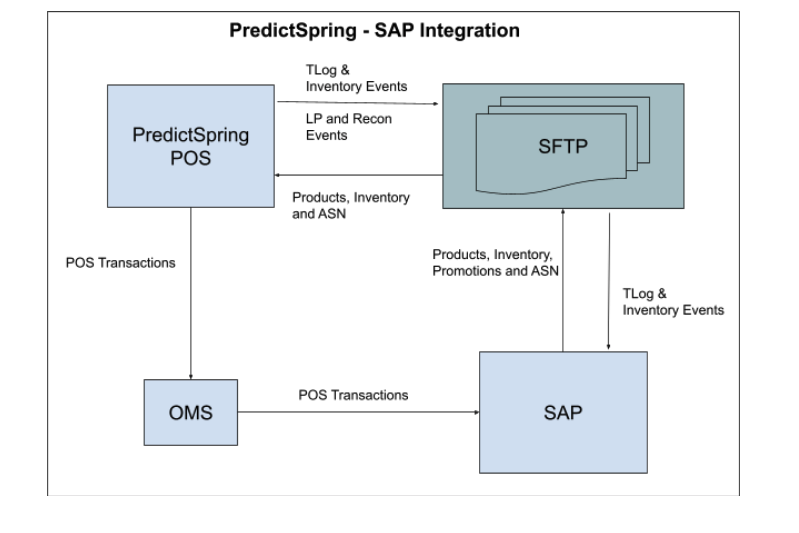
Integrate your POS with SAP ERP to manage products, inventory, and orders. SAP Financials data can be reconciled with POS. Link your SAP data to Point of Sale to align with your business requirements. Ensure that your customized SAP configuration works seamlessly with your POS system.
Product
POS needs product data to be ingested to enable all capabilities of platform. Merchants that use SAP as their product master generate a CSV / TSV / PSV formatted file and export it to an SFTP location. More details can be found in Product Feed.
Inventory
Inventory Import into Point of Sale
Store Inventory
For brands that use SAP as the master for Inventory, store inventory files are published to SFTP from SAP. These files are then ingested into Point of Sale cloud. Full store inventory files are loaded once a day and deltas are loaded hourly.
ASN
When a goods movement is initiated from warehouse to Store, SAP generates an ASN document in EDI-856 format. ASN data can also come in as CSV / TSV file. Specs are provided in ASN (Advanced Shipping Notice) Feed.
Inventory Events Export from Point of Sale
For Inventory operations that happen inside a store, CSV / TSV formatted files are exported to a SFTP location. Merchants system then reads these files and updates the appropriate tables inside SAP. As all SAP systems are configured differently, thus generic multi-use format keeps the integration simpler. The events to subscribe, columns to populate and sequence of columns are configurable on CMS.
For more details on Inventory Exports, see Exporting Inventory Events in Point of Sale CMS.
Orders
Order Export
For transactions that happen on POS, order data can be exported as a XML based TLOG, JSON based WebHook or API posting into a Point of Sale supported OMS. OMS would then export this order into SAP or brands would have their SI develop code that can read TLog / AP data and ingest order in SAP.
Details can be found in Transaction Log (TLog) Export