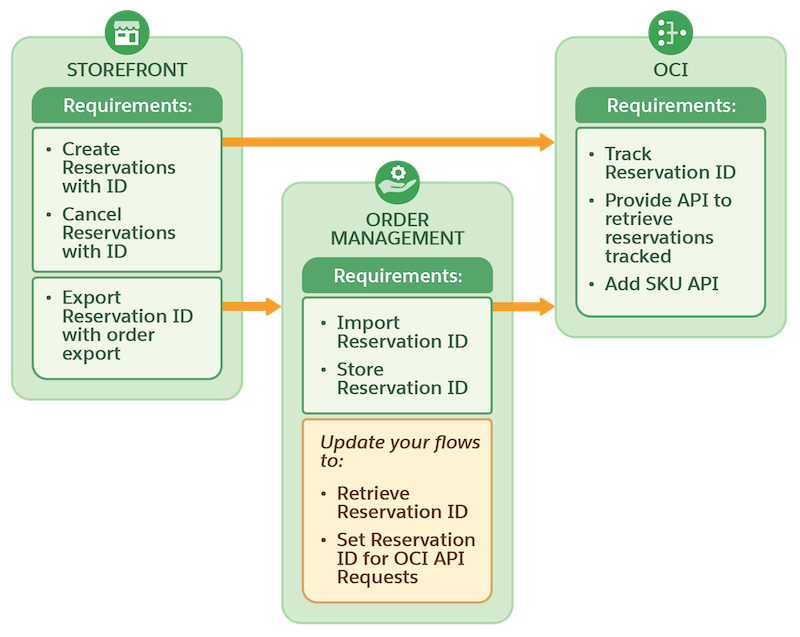
To provide an end-to-end ecommerce experience for shoppers and use reservation tracking,
integrate Omnichannel Inventory with both B2C Commerce and Salesforce Order Management. You can
also integrate with B2C Commerce and other third-party management applications.
Required Editions
To use Omnichannel Inventory with Salesforce Order Management, combine its flow core
actions with your routing logic to create and manage reservations as part of your automated
fulfillment processes. After completion, reservation IDs automatically import from B2C
transactions to Order Management. You can find reservation IDs in the
OrderSummaryAdditionalInfo object.
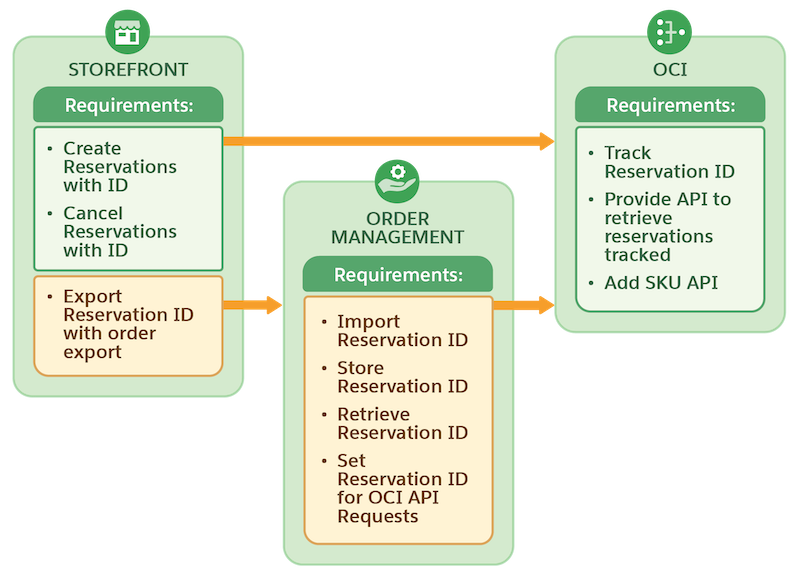
If you’re using Omnichannel Inventory with a third-party order management solution,
additional steps are required to integrate reservation tracking. For example, export the
reservation ID to use it for transfer, fulfill, or unreserve requests.
After you integrate reservation tracking, it isn’t applied to existing reservations. Old
reservations can show as open for 120 days until Omnichannel Inventory purges
them.