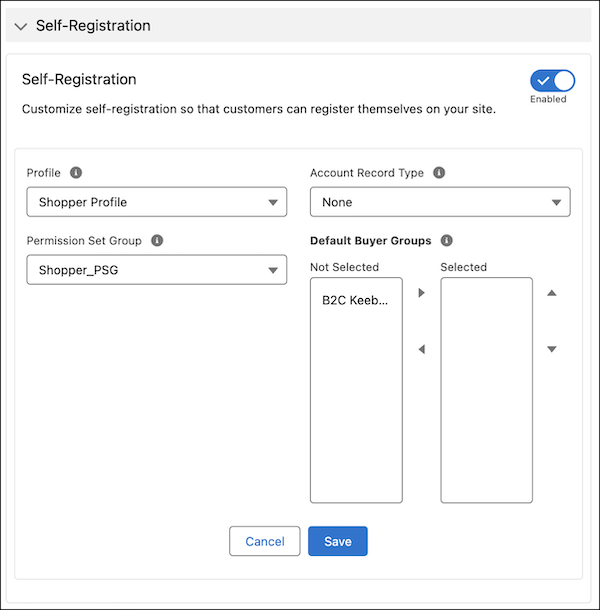
When you enable self-registration, customers can create their own account and then log in to your store using that account instead of browsing as a guest.
Required Editions
If you configure your Salesforce org by using the Commerce Setup Assistant and enable Person Accounts, self-registration is automatically enabled when you create a store. There's no need to manually enable self-registration if it’s already enabled.
These steps describe how to enable self-registration if you want to do so manually.
-
Before configuring self-registration, add the Self-Registration component and publish
the initial draft of your store.
Publishing your store doesn’t make it available to shoppers. The store isn’t available to shoppers until you activate it.
- In the navigation sidebar, select a store from the Store dropdown.
- Select Website Design, and then click Experience Builder.
- On your store’s Register page, add the Self-Registration component.
-
In the upper-right corner of the Experience Builder page, click
Publish.
You receive an email when the store is published.
-
Set up a site membership.
-
Click
 at the top of the page, and then select Setup.
- In the Quick Find box, enter Digital Experiences, and select All Sites.
- Next to your site, click Workspaces.
- Select Administration | Members.
- From the search list, select All.
- From the list of available profiles, select the customer profiles that you want to add, and click Add.
- Click Save.
-
Click
-
Configure and enable self-registration.
- In the navigation sidebar, select a store from the Store dropdown.
- Go to Settings | Store, and select Buyer Access.
- Go to Self Registration | Profile and select which customer profiles can self-register.
- (Optional) To set permissions, select a permission set group.
-
Select an account record type.
If you haven’t enabled person accounts, you can select only the business account record type or any child record type of a business account. See Create a Buyer for a B2B Store from a Person Account.
-
(Optional) Select the default buyer groups.
You can assign self-registering guests to up to 20 account-based buyer groups.If no default buyer group is selected, self-registering users won’t be automatically added to any group. You can manually assign them to a buyer group later.
- Turn on self-registration.
- Save your changes.

Example