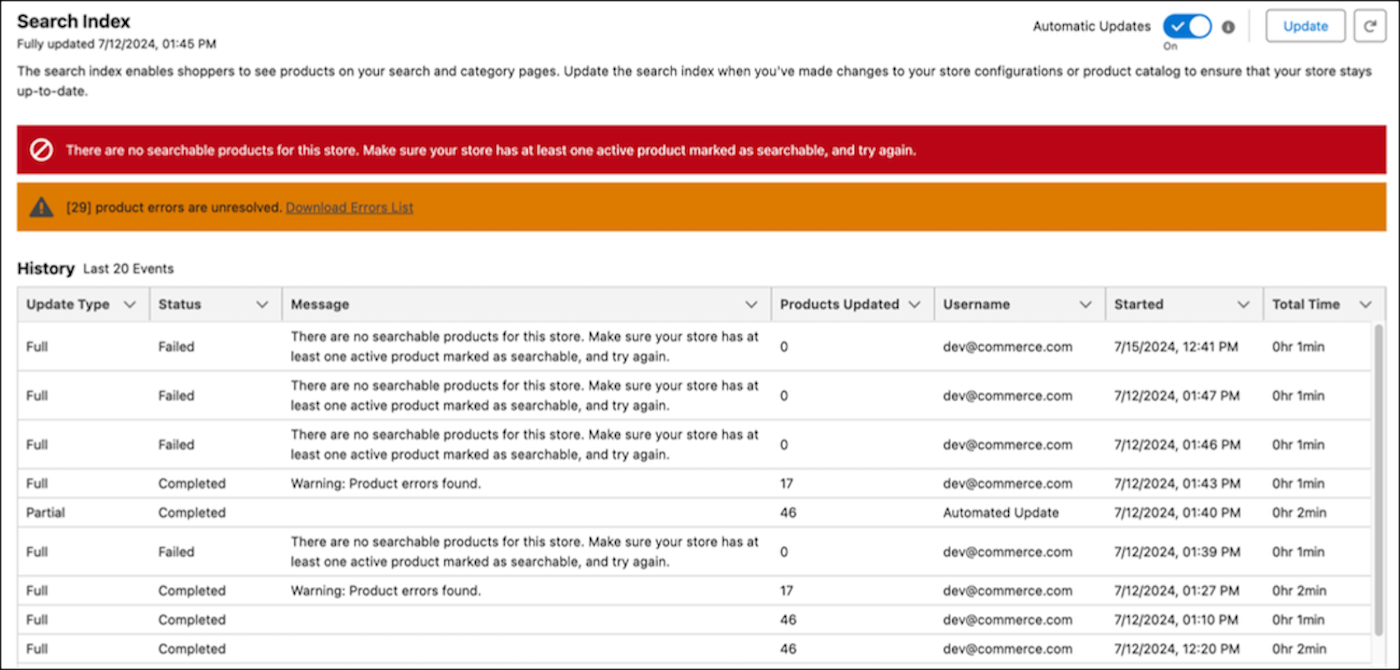
Updating the search index can result in product errors and index failures. If all
products have errors, the index fails. Review index failures in the red banner on the Search
Index page, and review product errors in the orange banner. You can also download a CSV file to
resolve product errors. Product errors and index failures are refreshed with each partial index
update.
Required Editions
| Index Update Status |
Scenario |
Maps To |
Action |
| Completed |
Index completed without product errors |
Completed status in History |
None |
| Index completed with product errors |
Orange product error banner |
Download the CSV file to resolve the product errors. See Commerce Search Index
Troubleshooting. |
| Failed |
Index failed without product errors |
Red index failure banner |
Use the message to resolve the index failure. |
| Index failed with product errors |
- Red index failure banner
- Orange product error banner
|
- In the red index failure banner, use the message to resolve the index
failure.
- In the orange product error banner, download the CSV file to resolve the product
errors. See Commerce Search
Index Troubleshooting.
|