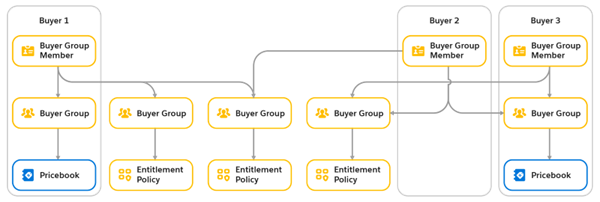
Set up buyer groups, entitlements, and price books to customize product visibility and pricing for each buyer in your store. Here are three examples of strategies you can consider for your store.
Required Editions
| View supported editions. |
Which Salesforce Commerce Product Do I Have?
Create Buyer Tiers
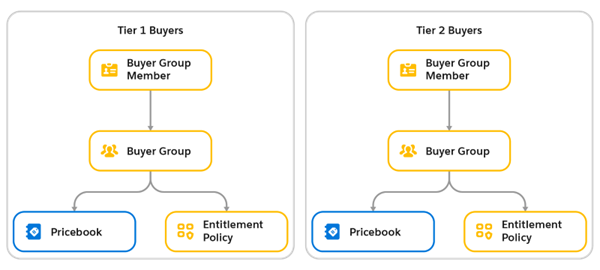
Use the buyer tiers strategy to spur buyer incentive. Buyers in higher tiers progressively get access to more products or deeper discounts. For each tier, set up one entitlement policy, one price book, and one buyer group.
Offer Buyer-Specific Pricing
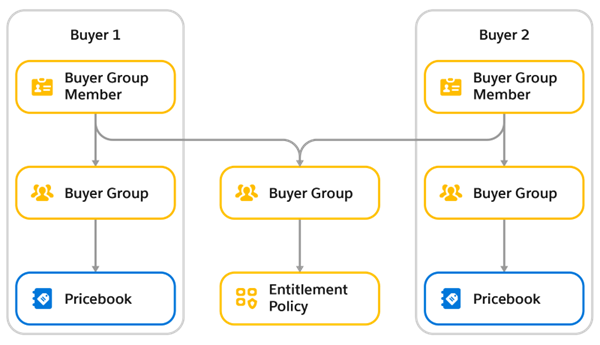
When your goal is to maximize profits, create one buyer group and entitlement policy for all buyers. Then, for each buyer, assign one price book and one buyer group. This strategy lets you set up buyer-specific pricing. This setup also works for use cases with different pricing tiers or groups.
Steer Customers to Specific Products
You can steer customers to specific products by controlling their access. Each buyer can see different groups of products based on their negotiated contract.
For each group of products, create one buyer group and one entitlement policy. Then associate each buyer to the buyer group for each group of products that you want the buyer to have access to. A single account can have membership in up to 20 buyer groups.