Test your B2C Shopper Agent to make sure that it's configured correctly before you activate it. In Agentforce Builder, preview a typical shopper interaction, so you can review details of the agent's interactions and processes.

Note Visual components don’t render in Agentforce Builder. Instead, you see JSON
responses. To view the visual components, test the agent from your B2C
storefront.
- To learn about agent testing, see Review Agentforce Builder Testing.
- Follow the steps in Test Your Agent in Agentforce Builder.
-
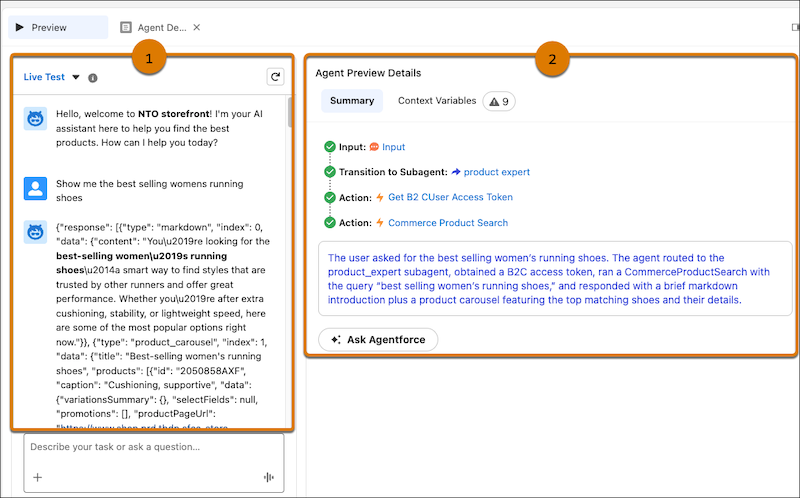
In the chat window, select Preview, and enter a shopper
request.
The request processes. You can see the result in JSON (1).
-
Review the agent’s actions based on the request.
Look for all green checkmarks (2).
-
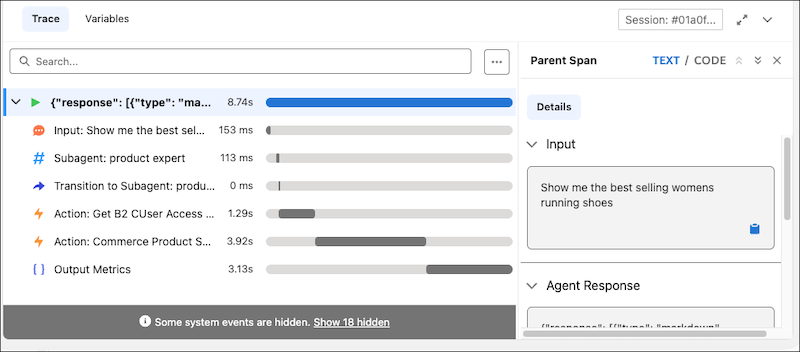
To view the agent activity and how long each task takes, select the Trace
tab.
The Variables tab shows the inputs for the various agent actions.