
View insights into the readiness status of the products in your B2C Commerce catalog from the Merchant Tools Home page or the product list.
For localized attributes, such as the product name and description, the readiness insights consider the default site locale.
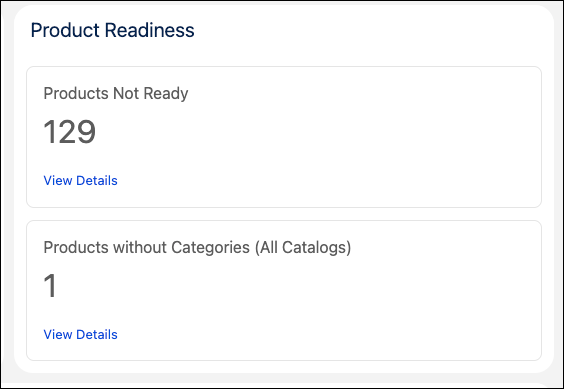
In Business Manager, click App Launcher  , and then select . Under Product Readiness, view the products in your catalog that aren't
storefront-ready or that aren't assigned a category. To navigate to a filtered list of
products that aren't storefront-ready, click View Details.
, and then select . Under Product Readiness, view the products in your catalog that aren't
storefront-ready or that aren't assigned a category. To navigate to a filtered list of
products that aren't storefront-ready, click View Details.
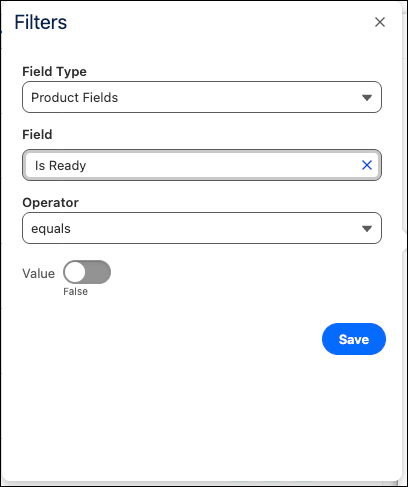
Alternatively, to view a list of products that are not storefront-ready, click App Launcher
, and then go to , filter by the product field Is Ready, and select
false. Then click Apply. Products that aren't
storefront-ready appear.
The Readiness column in the Product List displays the readiness status for each of the products in your catalog.
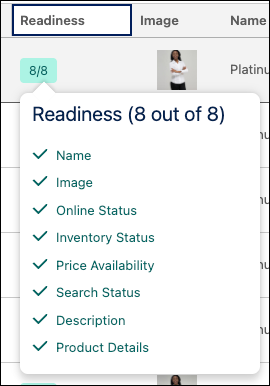
By default, the system runs these checks for each product in your site catalog:
- Name. A product name is added.
- Image. At least one product image is assigned.
- Online Status. The product is visible on the storefront.
- Inventory Status. The product is available in the inventory.
- Price Availability. The price is specified for the product.
- Search Status. The product is included in the search index.
- Short Description. A product short description is available.
- Product Details. The long description is available.
If required, you can customize the readiness checks.
Hover over the readiness score to view the details of the readiness checks. If any of the data is missing, see Edit Product Details to add or update the corresponding field.
By default, the Readiness column is included in product lists created in the B2C Commerce 26.4 release and later. If you're using an older product list and want to include the Readiness column, add it using the column picker. See Product Lists for B2C Commerce.
View the jobs for analyzing product readiness from . The job run time depends on the size of your catalogs and the number of stores.
- sfcc-calculate-product-readiness. Calculates the data for Price and Stock filters.
- sfcc-calculate-product-insight. Calculates the data for the Is Ready filter.
Customize a Product Readiness Check
A product readiness check confirms that a product is storefront ready. Specify the fields that a product must have for it to be considered storefront ready.
- In Merchant Tools, select Product List.
- Click the gear icon and select Custom Readiness.
- Select up to 20 fields required for product readiness.
-
Apply your changes.
When you apply the changes, the product readiness insights job runs.
Monitor the status of the product readiness insights job (sfcc-calculate-product-insight) on the Administration console.