
A variation group is a B2C Commerce product type that represents a subset of a base product's variation products, such as all blue hiking boots in any size. Each variation group belongs to one base product, holds only one value per variation attribute, and derives its inventory from its member SKUs. Learn how variation groups handle unassigning and deleting, category assignment, and attribute inheritance from the base product, and how to apply them across your storefront.
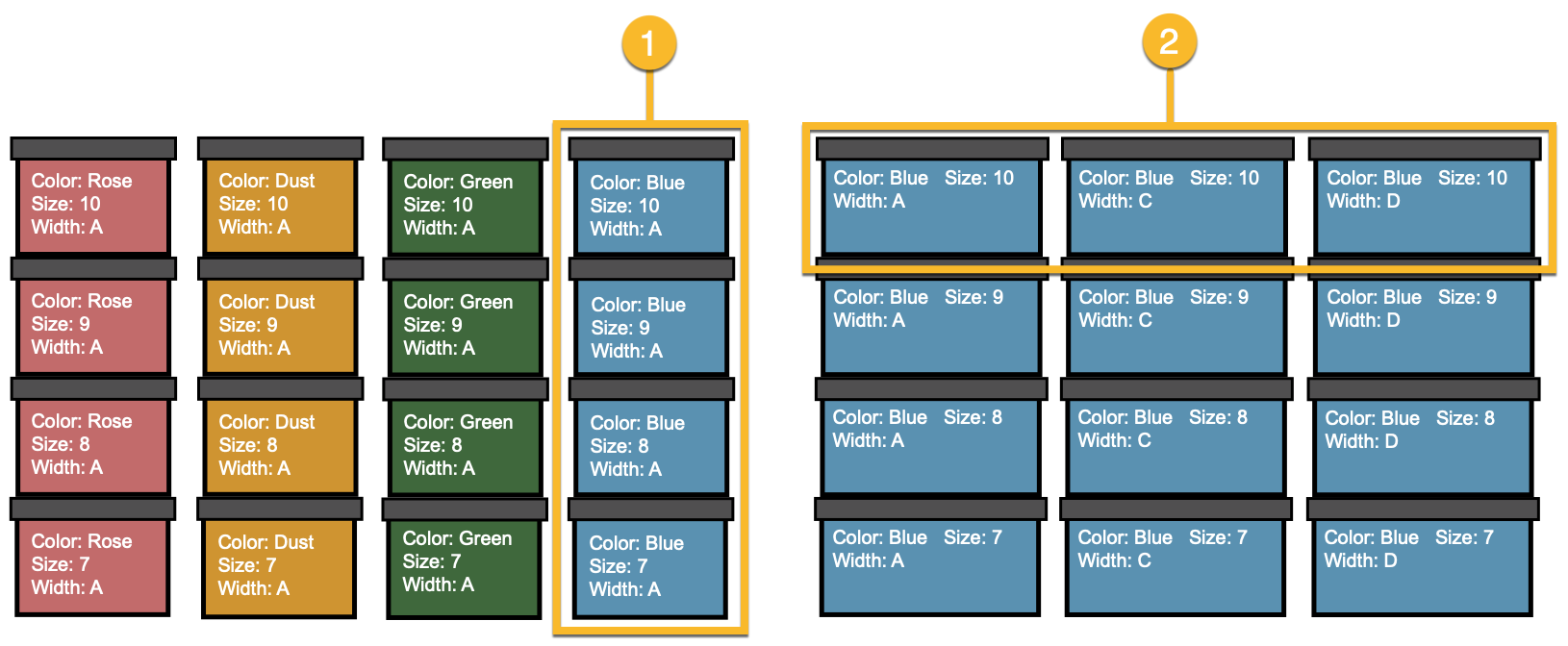
For example, variation groups of hiking boots can include:
- All blue boots of any size that belong to the base product.
- All blue boots size 10, and of any width.
It isn't possible to create a variation group that includes more than one value of a variation attribute. For example, you can't create a variation group that contains both blue and orange variation products. However, you can add multiple variation groups to a product set and have a single image for the product set that represents both groups.
A variation group is assigned to a base product. It isn't possible to assign a variation group to more than one base product. If the base product ceases to be a base product or is deleted from the system, B2C Commerce deletes related variation groups.
Variation products are assigned to variation groups. Deleting or unassigning a variation group doesn't affect the variation base product it's assigned to or the variation products assigned to it.

The variation group derives its inventory from the collection of SKUs associated with the group. A variation group can have its own SKU assigned to it. A variation group is mutually exclusive with other product types (product set, bundle, base product, variation). However, a variation group can be a set product or a bundled product.
Unassign Variation Groups
To temporarily disable a variation group for a product, unassign it from the product. If you unassign a variation group, the variation group isn’t removed from B2C Commerce and it can be cloned or assigned again.
Deleting a variation group removes it. Deleting a variation group doesn't affect the base product or the variation products.
Variation Groups and Categories
A variation group can be assigned to any category, just like other products:
- Variation group can be assigned to a category by import
- Variation group can be assigned to and from a category in the Business Manager bulk editor or product editor
- Variation group can be sorted or use category position within a category
- Multiple variation groups of the same base product (colors: red and green) can be assigned to the same category
- A base product and some or all of its variation groups can be assigned to the same category
Variation Groups and Property Inheritance
The sorting order of Variation Groups on the Variations tab is used for the attribute inheritance lookup. If the variation product doesn't define its own value for an attribute, the value is first retrieved from other variation groups of the same base product (sorted by position). If the value isn't provided by one of the variation groups, the value is retrieved from the base product.
Apply Variation Groups
After you create variation groups, apply them across your storefront:
- Import variation groups through the standard catalog import process. B2C Commerce supports the variation group product type in the Catalog.xsd schema and supports merge-mode for imports.
- Search to find all variation groups.
- Assign a variation group to a content slot. Note In the storefront, clicking a content slot with a variation group assigned to it displays the product detail page for the base product. The product detail page shows the selected attributes of the variation group with an appropriate image, similar to the way product sets are merchandised.
- Assign a category position to a variation group, so you can show all red handbags before all gold handbags.
- Assign a variation group to a category or subcategory regardless of the base product's primary and storefront category. For example, sell all red variation products in any size using a Holiday category.
- Assign a variation group to a promotion.
- Assign a variation group to a product set, so you can create outfits in specific colors with products that can be sold in any size.
- Control storefront search behavior through search preferences for products that have variation groups.
- B2C Commerce collects active data for a variation group as an aggregation of the variation products in the group.
Also use the B2C Commerce Script API to show variation groups on landing pages, category pages, and customized search experiences.