
A flow controls the sequence in which B2C Commerce executes job steps. Every job must contain at least one flow. Each flow must contain at least one step.
Configure sequential flows, which execute one after the other. You can also configure sibling flows, which execute in parallel. Combine sequential and parallel flows in a job. For example, sibling parallel flows download catalog files, followed by a sequential flow that imports catalog files, followed by another set of sibling parallel flows that download price files, followed by another sequential flow that imports the price files. The job can finish with a sequential flow that reindexes and replicates to production.
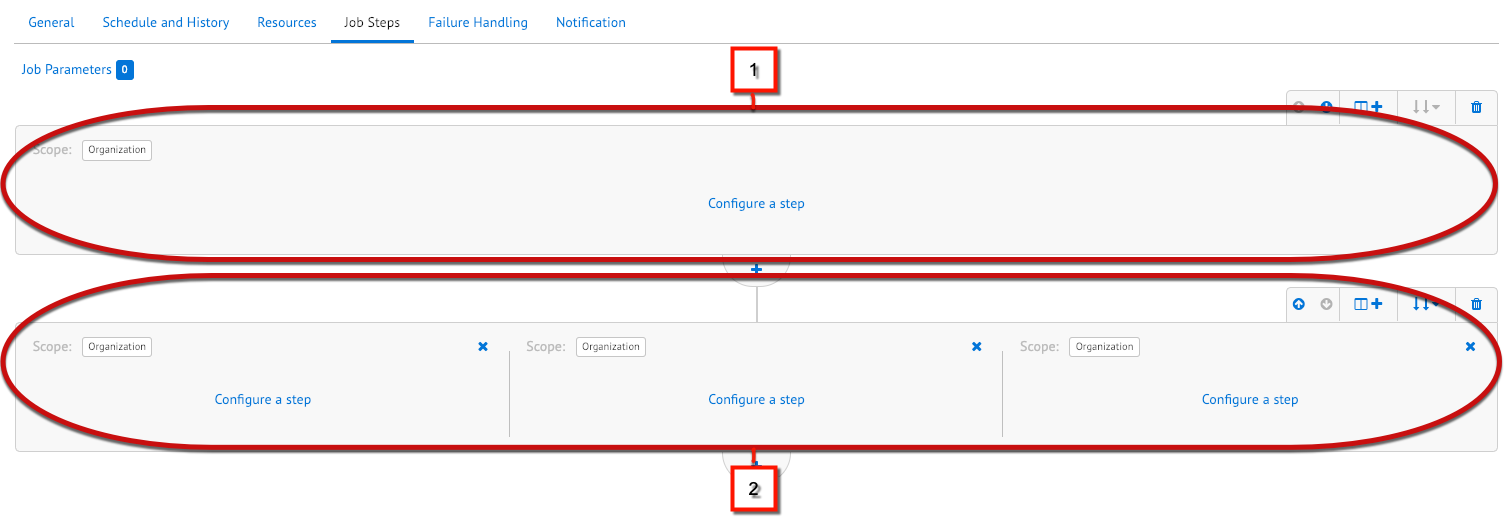
In the Business Manager UI, sequential flows take up the width of the screen (1) and execute in the order shown, from top to bottom. Sibling flows appear next to each other and run simultaneously as long as system resources are available (2).
If parallel execution isn't possible, for example, when multiple steps must access the same resources at the same time, configure sibling flows to execute sequentially. Sequential sibling flows execute from left to right.
If system resources aren't available, B2C Commerce executes sibling flows sequentially. If a job step doesn't support parallel execution, B2C Commerce executes the sibling flows sequentially. For example, the ExecutePipeline system step that supports legacy pipelines is always executed sequentially to avoid database conflicts.