
Turn on Under Attack Mode from the Configure Zone screen in Business Manager to present a challenge to every visitor to your B2C Commerce storefront during an active DDoS attack. Use it only as a last resort.

Under Attack Mode is a toggle in the top right corner of all tabs in the Configure Zone screen. When enabled, Cloudflare slows down visits to the targeted storefront and presents a Completely Automated Public Turing test to tell Computers and Humans Apart (CAPTCHA) challenge to every unique visitor before allowing access to the site. For background, see eCDN Zone Settings in Business Manager.
-
In Business Manager, click App Launcher
 , and then select .
-
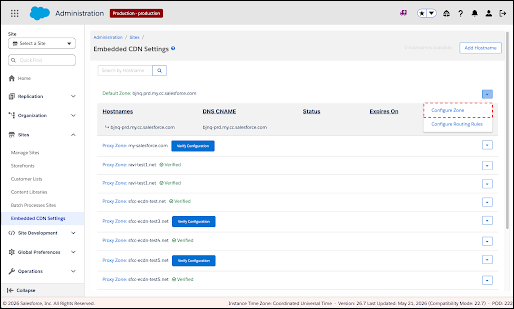
Locate the zone you want to configure, open the zone's actions menu on the right side
of the zone row, and select Configure Zone.
The Configure Zone screen opens for the selected zone.
Configure Zone option in zone actions menu
-
Turn on the Under Attack Mode toggle in the zone header, and in
the confirmation dialog, click Enable.
Under Attack Mode toggle in zone header
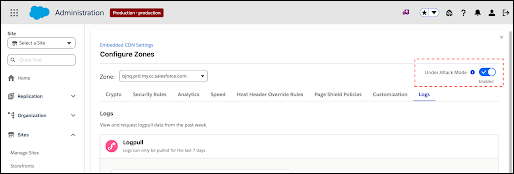
Under Attack Mode shows an interstitial challenge to every visitor before allowing access to your storefront.
To turn off Under Attack Mode, switch the toggle off. No confirmation is required.
To customize the challenge page shown while Under Attack Mode is on, see the I am under attack Page in Configure Custom Error Pages for an eCDN Zone.