
Required and optional fields for each eCDN Logpush destination type on your B2C Commerce storefront: Amazon S3, Google Cloud Storage, Azure Blob Storage, Datadog, and Splunk.
Which Salesforce Commerce Product Do I Have?
Fill in these fields on the Destination Details step of the New Logpush Job wizard. For the full procedure, see Create a Logpush Job.
Amazon S3
Use Amazon S3 to push gzip-compressed log batches to an S3 bucket that you own.
- Bucket (required)
- Name of your S3 bucket.
- Region (required)
- AWS region of the bucket, for example, US East (N. Virginia), Europe (Frankfurt), or Asia Pacific (Tokyo).
- Path (optional)
- Prefix inside the bucket where log files land.
- My policy requires AWS SSE-S3 AES256 Server Side Encryption (optional)
- Select when your bucket policy requires SSE-S3 encryption on writes.
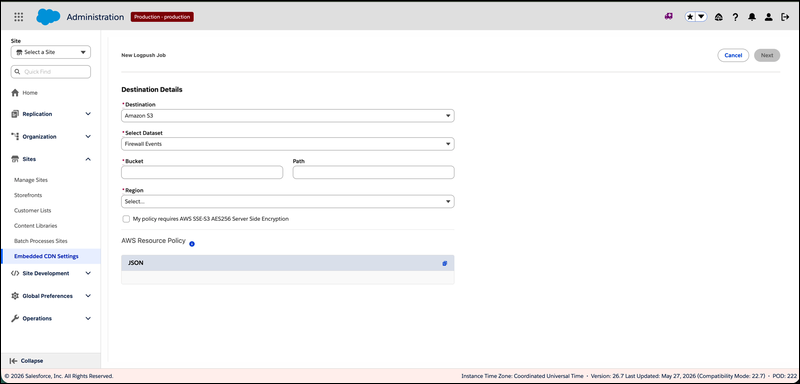
After you fill in Bucket and Region, the screen displays an AWS Resource Policy JSON snippet, and eCDN drops a one-time challenge file into your bucket to prove ownership. Both steps are part of the create procedure. See Create a Logpush Job.
Google Cloud Storage
Use Google Cloud Storage to push gzip-compressed log batches to a GCS bucket.
- Bucket (required)
- Name of your GCS bucket.
- Path (optional)
- Prefix inside the bucket.
After you save the destination details, grant the Cloudflare Logpush service account write permission on the bucket and complete the ownership challenge. See Create a Logpush Job.
Azure Blob Storage
Use Azure Blob Storage to push gzip-compressed log batches to a storage container.
- SAS URL (required)
- Container-level Shared Access Signature URL with write permission. The URL must include
sp=w(or equivalent write rights) and must not expire before you intend to retire the job. - Path (optional)
- Prefix inside the container.
Datadog
Use Datadog to stream logs directly to a Datadog ingestion endpoint.
- Datadog Site (required)
- The Datadog site that owns your account, for example,
datadoghq.com,datadoghq.eu, orus3.datadoghq.com. - API Key (required)
- A Datadog API key with
logs_writepermission.
Splunk
Use Splunk to stream logs to a Splunk HEC (HTTP Event Collector) endpoint.
- HEC URL (required)
- The HEC ingestion URL, for example,
https://<your-splunk>:8088/services/collector/raw. - HEC Token (required)
- The HEC token with permission to write to the destination index.
- Channel ID (required)
- A unique GUID identifying this channel. Click Generate UUID to create a new one.
- Source Type (required)
- The Splunk source type to assign to records, for example,
cloudflare:json. - Insecure Skip Verify (optional)
- Select to skip TLS certificate validation. Use only for non-production endpoints.