
Default Domain is a Salesforce-managed, eCDN-enabled hostname provided for each B2C Commerce instance (development, staging, and production), so you can test without manual DNS, custom domain registration, or certificate management. Use the Default Domain for developer testing, load testing, and preproduction review, whether you're working alongside an existing custom branded domain (for example, www.example.com) or haven't set one up yet.
Which Salesforce Commerce Product Do I Have?
For a developer-focused overview of Default Domains, instance eCDN, and SSL, see the blog post Salesforce B2C: Default Domains, Instance eCDN & SSL for Devs. On On-Demand Sandboxes (ODS), the Default Domain is the only option. Custom domains on ODS via eCDN aren't supported. See Default Domain on On-Demand Sandboxes (ODS).
Example Default Domain format:
<realm>-<stg>.my.commercecloud.salesforce.com (for example,
abcd-stg.my.commercecloud.salesforce.com).
Accessing the Default Domain
After provisioning a new realm, the Default Domain is immediately available on all your instances. You don't need to set it up.
In Business Manager, the Embedded CDN settings page lists the Default Domain as one of the hostnames.
- To access the Default Domain: Use the provided URL in your
browser.
- Development or Staging: These environments are typically protected sites; authenticate with your user credentials to access. eCDN security rules allow, block, or rate limit requests to your storefront or Business Manager. For information on how to create these rules, see Create a Custom Firewall Rule for an eCDN Zone. A Block All rule blocks every request, so if you add one to a Development or Staging zone, no one can reach the Default Domain for that environment.
- Production: The Production Default Domain is for reviewing,
comparing, and testing your site. It isn't for public access. To go live, take orders,
and receive public traffic, set up your own custom domain. If you don't have a
custom domain, you might run into issues with Page Designer and Preview. To resolve
these issues, use one of these options:
- Create a custom hostname for Page Designer and Preview traffic.
- Create a custom rule in the Default Domain zone that allows your IP addresses or user agents.
- Turn off the Block All rule in Production.
 Note Removing the foundational Block All rule makes the Default Domain fully public for all sites in Production and, therefore, isn't a recommended option without additional security or rate limit rules.
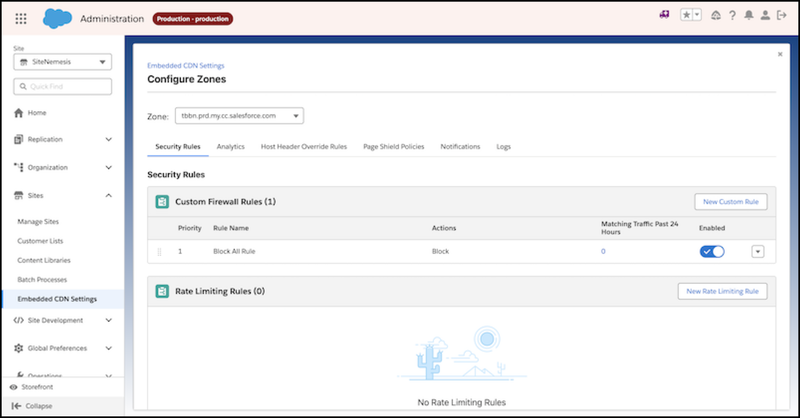
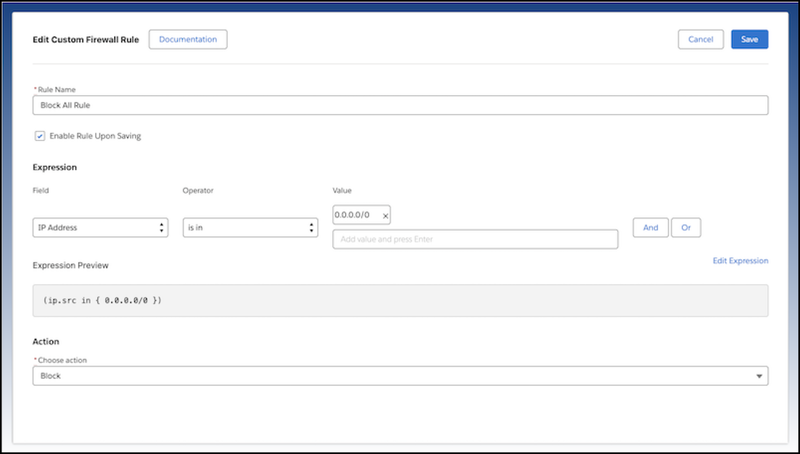
Default Production security configuration: To keep the Production Default Domain private, it has a final Block All rule at the eCDN layer. If you turn off the Block All rule, the Default Domain site becomes publicly accessible. To give specific users access, add Allow rules above the Block All rule that allow only trusted traffic, for example, your office's IP addresses.
Configuring eCDN on the Default Domain
The Default Domain is fully configurable via both the Business Manager (BM) UI and the CDN API, just like a custom domain. You can also stack an external CDN in front of the Default Domain. For details, see Configure an External CDN or Third-Party Proxy.
| Configuration Area | Availability | Details |
|---|---|---|
| web application firewall (WAF), Speed, Routing Rules | BM UI and CDN API | Create, edit, and test all security and performance rules to mirror production eCDN setups. |
| Host Names | BM UI and CDN API | The Default Domain hostname is read-only and can't be changed or deleted. |
| Certificates | BM UI and CDN API | Salesforce manages SSL/TLS for the Default Domain entirely. You can't upload, delete, or renew the certificate. |
Impact on Custom Domains
The Default Domain doesn't change the functionality or behavior of existing custom domains.
- Coexistence: Default and custom domains can exist on the same instance.
- Branding: Custom domains remain preferred for external, branded storefronts.
- Consistency: Changes to the Default Domain don't affect your custom domain configuration.
Key Caveats
- Protected Sites: Protect the Default Domain similarly to a protected storefront. See B2C Storefront Password Protection.
- Certificate Management: Editing, deleting, or uploading certificates for the Default Domain is blocked and is visually disabled in BM UI. Attempts to perform these actions result in an error.
- Realm Availability: The Default Domain is automatically visible for new realms created after the 26.1 CDN API release. Existing realms are onboarded during the pilot/migration phase.
- Default Domain on On-Demand Sandboxes
B2C Commerce On-Demand Sandboxes (ODS) are served exclusively through the Salesforce-managed Default Domain starting with the 26.6 release. When you create a development, production, or partner ODS instance, B2C Commerce provisions the Default Domain automatically and handles DNS and certificates for you.