
Create a notification rule to bind a webhook destination to one or more eCDN zones for your B2C Commerce storefront and control whether delivery is enabled. Toggling a rule off pauses delivery without deleting the rule.
Register the webhook destination that the rule delivers to before you begin. See Create a Notification Destination.
Which Salesforce Commerce Product Do I Have?
A notification rule uses these fields.
- Webhook (required): Destination that receives notification events.
- Enable Notification Upon Saving (optional): Starts delivery immediately when you save the rule.
- Zones (required): Zones covered by the rule. Select All or select a subset.
- In Business Manager, click the App Launcher, then select .
- Locate the zone you want to configure, and select Configure Zone from the actions menu.
- Click the Notifications tab.
-
In the Notifications section, click New Notification.
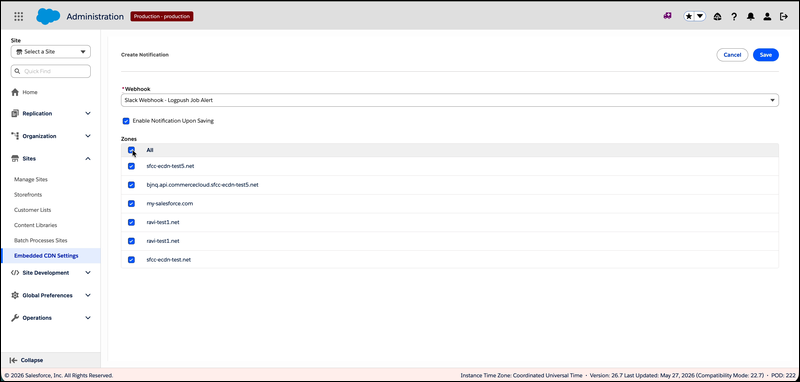
The Create Notification screen opens.
-
Open the Webhook dropdown and select the destination you registered.
If the destination you want isn't in the list, register it first in the Destinations section.
-
To start delivering immediately, select Enable Notification Upon
Saving.
Leave this option cleared to create the rule in a paused state.
-
Select the Zones that the rule applies to.
Select All to include every zone in the list, or select zones individually. The current zone is selected by default.
-
Click Save.
A confirmation toast appears, and the rule shows up in the Notifications table with the Enabled toggle reflecting the choice you made on the form.
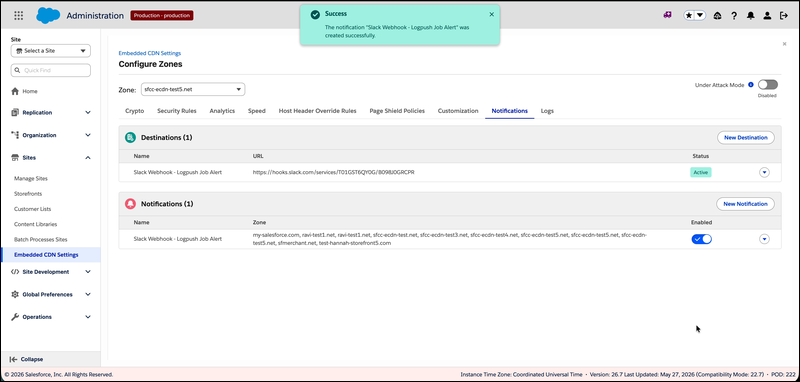
eCDN sends runtime event notifications to the selected destination for each enabled zone. If a selected zone no longer resolves after the page loads, a warning toast names the zone and saves the rule without that binding. Refresh the page and edit the rule to re-select any missing zones.
To change, pause, or remove a rule after you create it, see Manage Notification Rules.