
Use the Configure Zone screen in Business Manager to manage settings for an embedded CDN (eCDN) zone for B2C Commerce, including certificates, security rules, performance, custom pages, notifications, and logs.

<shortcode>.api.commercecloud.salesforce.com hostname. For a
SCAPI zone, Configure Zones shows the Crypto (read-only), Security Rules, and Analytics
tabs, plus Purge Cache. See SCAPI Zone Support for B2C Commerce.The Configure Zone screen organizes zone settings into tabs.
| Tab or control | Purpose |
|---|---|
| Crypto tab | SSL/TLS, certificates, and HTTP Strict Transport Security (HSTS). See Configure Crypto Settings for an eCDN Zone. |
| Security Rules tab | WAF managed rulesets, realm and zone security rules, custom firewall rules, and rate limiting. See eCDN Zone Security Rules. |
| Analytics tab | HTTP and security traffic metrics for the zone. See Analyze HTTP and Security Traffic for an eCDN Zone. |
| Speed tab | Performance optimizations. See Configure Speed Settings for an eCDN Zone. |
| Host Header Override Rules tab | Rewrite the Host header for matching requests. See Configure a Host Header Override Rule for an eCDN Zone. |
| Page Shield Policies tab | Client-side script monitoring for PCI compliance. See Configure a Page Shield Policy for an eCDN Zone. |
| Customization tab | Custom error and challenge pages. See Configure Custom Error Pages for an eCDN Zone. |
| Notifications tab | Webhook destinations and notification rules. See eCDN Zone Notifications. |
| Logs tab | Logpush streaming and Logpull downloads. See Logpush and Logpull for an eCDN Zone. |
| Under Attack Mode toggle (zone header) | Emergency interstitial challenge for all visitors. See Enable Under Attack Mode for an eCDN Zone. |
Configure Zone tab layout in Business Manager
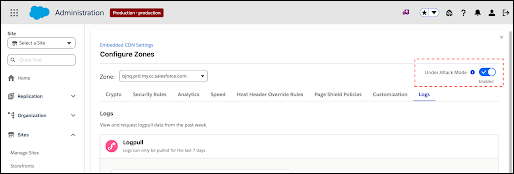
On the Embedded CDN Settings page, each zone's dropdown menu includes Configure Zone and Configure Routing Rules. These options open separate screens. The topics linked from this page cover only the Configure Zone tabs. Configure Routing Rules sets up Managed Runtime (MRT) routing and isn't available for SCAPI zones.
The
               embedded CDN has not been enabled
appears on the Embedded CDN Settings
page.Under Attack Mode is available as a toggle in the top right corner of all tabs in the Configure Zone screen. Enable Under Attack Mode only as a last resort during an active DDoS attack. When enabled, Cloudflare slows down visits to the targeted storefront and presents a Completely Automated Public Turing test to tell Computers and Humans Apart (CAPTCHA) challenge to every unique visitor before allowing access to the site. Under Attack Mode isn't available on SCAPI zones. For steps, see Enable Under Attack Mode for an eCDN Zone.
Security Level settings (Low, Medium, High) are now automated by Cloudflare and are no longer configurable. Under Attack Mode is the only remaining manual firewall-level control.
- Configure Crypto Settings for an eCDN Zone
Configure SSL/TLS and cryptography settings for a B2C Commerce eCDN zone, including Transport Layer Security (TLS) version and HTTP Strict Transport Security (HSTS), using the Configure Zone screen in Business Manager. - eCDN Zone Security Rules
Use the Security Rules tab on the Configure Zone screen to protect a B2C Commerce embedded CDN (eCDN) zone with web application firewall (WAF) managed rulesets, realm and zone security rules, custom firewall rules, and rate limiting. Learn what each control does, which zone types are eligible, and how traffic from trusted sources bypasses security checks. - Analyze HTTP and Security Traffic for an eCDN Zone
To get insights into HTTP traffic and security data, use the eCDN Analytics tab in B2C Commerce Business Manager. The Analytics tab shows the Traffic Analysis timeline chart, top traffic statistics across multiple dimensions, and per-rule activity. Switch between HTTP and Security views to see request traffic or firewall events for the same zone and time range. - Configure Speed Settings for an eCDN Zone
Optimize B2C Commerce eCDN zone performance by enabling speed settings such as Early Hints, HTTP/3, and image compression via the Configure Zone screen in Business Manager. - Configure a Host Header Override Rule for an eCDN Zone
To support a single hostname across multiple realms, create a Host Header Override Rule for B2C Commerce sites that use an external content delivery network (CDN). This rule replaces unique hostnames with a common hostname to maintain the single-hostname setup. If you reuse a hostname, traffic can be unintentionally served from a different realm. - Configure a Page Shield Policy for an eCDN Zone
Set up a Page Shield policy to make sure only trusted scripts run on sensitive store pages like cart and checkout. A Page Shield policy helps detect client-side script changes and supply chain risks, and helps your B2C Commerce store comply with the Payment Card Industry Data Security Standard (PCI DSS) 4.0.1 client-side security requirements. - Configure Custom Error Pages for an eCDN Zone
Set custom HTML error pages for 500-class and 1000-class errors generated by the embedded CDN for a B2C Commerce zone, using the Configure Zone screen in Business Manager. - eCDN Zone Notifications
Get notified when eCDN events on your B2C Commerce storefront that matter to you happen, such as a Logpush job failure on a PCI-bound zone, a security incident, or a configuration change, without having to watch dashboards. The Notifications tab on the Configure Zone screen lets you configure webhook destinations and wire them up to one or more zones. - Logpush and Logpull for an eCDN Zone
Stream B2C Commerce eCDN request, security, and Page Shield logs to your own storage or observability platform (Amazon S3, Google Cloud Storage, Azure Blob Storage, Datadog, or Splunk), or download recent logs on demand, all from the Logs tab on the Configure Zone screen in Business Manager. - Enable Under Attack Mode for an eCDN Zone
Turn on Under Attack Mode from the Configure Zone screen in Business Manager to present a challenge to every visitor to your B2C Commerce storefront during an active DDoS attack. Use it only as a last resort.