
Realm Security Rules let you define Managed IP Address Lists and custom firewall rules that control how trusted IP traffic is handled across all your eCDN zones for B2C Commerce. These rules replace the legacy Trusted IP configuration.

Realm Security Rules provide two components that work together to manage trusted IP traffic:
- Managed IP Address Lists
- Named lists of IP addresses or CIDR ranges. You can scope a list to your entire realm (account level) or to a single zone (zone level). See Manage IP Address Lists for eCDN Zones.
- Custom firewall rules
- Rules that reference your IP address lists and define a skip action, so traffic from trusted IPs bypasses selected security checks. See Create a Custom Firewall Rule for an eCDN Zone.

For information about what traffic a skip rule bypasses, the DDoS Layer 7 overrides, eligible zone types, and the feature switch that controls this functionality, see eCDN Zone Security Rules.
The Realm Security Rules Tab in B2C Commerce
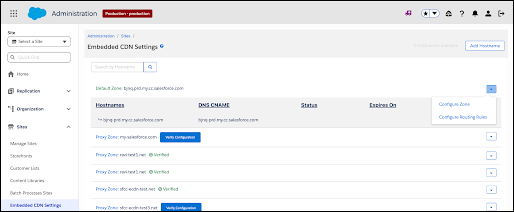
Realm Security Rules is a sub-tab of the Security Rules tab on the Configure Zone screen. To open the Configure Zone screen, select Configure Zone from a zone's dropdown menu on the Embedded CDN Settings page.
Configure Zone option in the zone dropdown menu
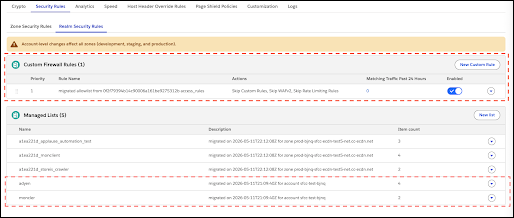
At the account level, the tab lists your custom firewall rules and Managed IP Address Lists, including rules migrated from legacy Trusted IP configurations.
Realm Security Rules tab — account level
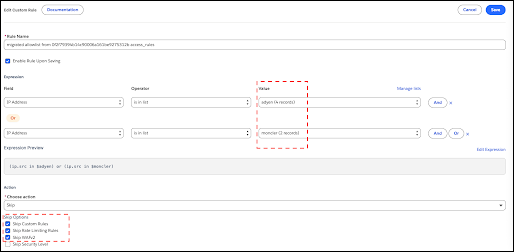
Each custom firewall rule uses IP address list conditions to match trusted traffic, and skip actions to define which security checks that traffic bypasses.
Custom firewall rule — skip action detail
Managed IP Address Lists and their associated custom firewall rules can be scoped at two levels:
| Scope | Where it applies | Eligible zone types |
|---|---|---|
| Account (Realm) | Applies to all eligible zones in your realm, including development, staging, production, and sandbox instances. | Proxy, Legacy, Default Domain, and SCAPI zones |
| Zone | Applies only to the specific zone you're configuring. Two zones in the same realm can have independent zone-level lists with the same name without conflict. | Proxy, Legacy, Default Domain, and SCAPI zones |
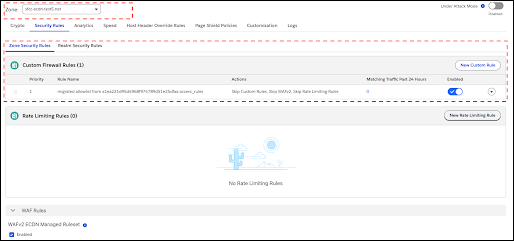
Realm Security Rules tab — zone level
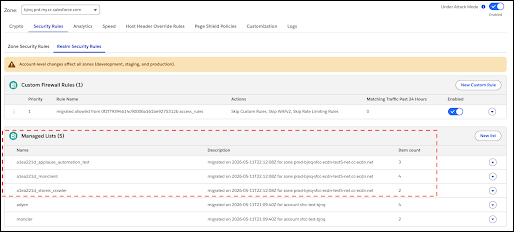
Zone Security Rules tab
Realm Security Rules Permissions in B2C Commerce
| Action | Required role |
|---|---|
| View Realm Security Rules and lists (any instance) | eCDN Admin or eCDN Viewer |
| Create, edit, or delete rules and lists | eCDN Admin (Production instance only) |
On non-production instances (staging, development, sandbox), the Realm Security Rules tab is read-only. A blue information banner indicates: "Realm-level configuration is read-only on this instance. Use the Production instance to make changes."
On Production, an amber warning banner indicates: "Account-level changes affect all zones (development, staging, and production)."
- Manage IP Address Lists for eCDN Zones
Create named lists of trusted IP addresses or CIDR ranges to use with custom firewall rules that bypass security checks for trusted traffic on your B2C Commerce storefront. - Trusted IP Migration to WAF Custom Rules
Salesforce automatically migrates your legacy B2C Commerce Trusted IP configurations to web application firewall (WAF) custom rules and Managed IP Address Lists in the new Realm Security Rules tab. Learn what the migration does and how to verify your migrated configuration.