
Get notified when eCDN events on your B2C Commerce storefront that matter to you happen, such as a Logpush job failure on a PCI-bound zone, a security incident, or a configuration change, without having to watch dashboards. The Notifications tab on the Configure Zone screen lets you configure webhook destinations and wire them up to one or more zones.
Which Salesforce Commerce Product Do I Have?

How eCDN Notifications Work
The Notifications tab is split into two sections.
- Destinations: Webhook endpoints that receive notification payloads, such as a Slack incoming webhook or a custom HTTPS endpoint.
- Notifications: Notification rules that bind a destination to one or more zones and toggle delivery on or off.
A destination is reusable across multiple notification rules and across zones. Register it once in the Destinations table, then reference it from any number of Notifications rows.
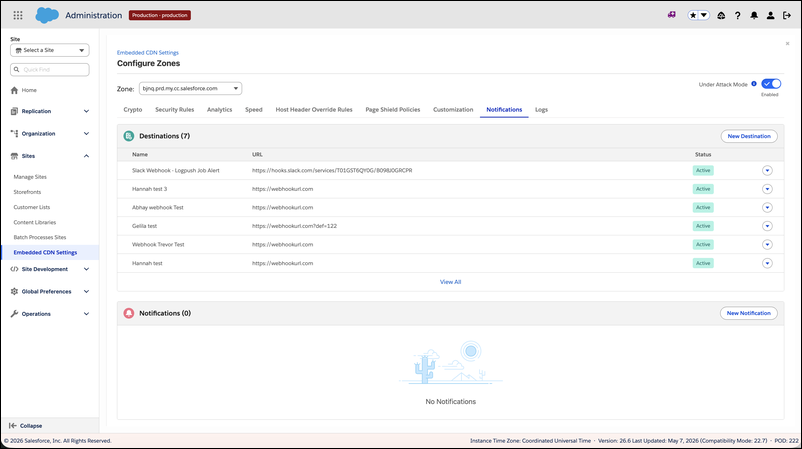
After you configure notification rules, eCDN sends runtime event notifications to the selected destinations for each enabled zone. Common use cases include PCI compliance alerts, security events, and configuration drift detection.
Configure Notifications for a Zone
Notification setup is covered in these tasks.
- Create a Notification Destination
- Create a Notification Rule
- Set Up PCI Compliance Alerts
- Manage Notification Rules
For the other controls on the Configure Zone screen, see eCDN Zone Settings in Business Manager.
The Notifications Tab Isn't Showing
- Create a Notification Destination
Register a webhook destination that receives eCDN notification payloads for your B2C Commerce storefront, such as a Slack incoming webhook or a custom HTTPS endpoint. A destination is reusable across multiple notification rules and across zones. - Create a Notification Rule
Create a notification rule to bind a webhook destination to one or more eCDN zones for your B2C Commerce storefront and control whether delivery is enabled. Toggling a rule off pauses delivery without deleting the rule. - Set Up PCI Compliance Alerts
Get alerted when an eCDN Logpush job fails on a zone that carries PCI-scoped traffic for your B2C Commerce storefront. Wiring a notification rule to your SIEM or on-call tool lets you detect a stalled PCI log stream before the audit window expires. - Manage Notification Rules
Pause, resume, edit, or delete the eCDN notification rules that target a zone on your B2C Commerce storefront. The Notifications table shows every rule that targets the current zone, along with the destination it delivers to, the full zone list, and an Enabled toggle.