
Stream B2C Commerce eCDN request, security, and Page Shield logs to your own storage or observability platform (Amazon S3, Google Cloud Storage, Azure Blob Storage, Datadog, or Splunk), or download recent logs on demand, all from the Logs tab on the Configure Zone screen in Business Manager.
Which Salesforce Commerce Product Do I Have?

Note Logpush and Logpull aren't available on SCAPI zones. See SCAPI Zone Support for B2C Commerce.
How Logpush and Logpull Differ
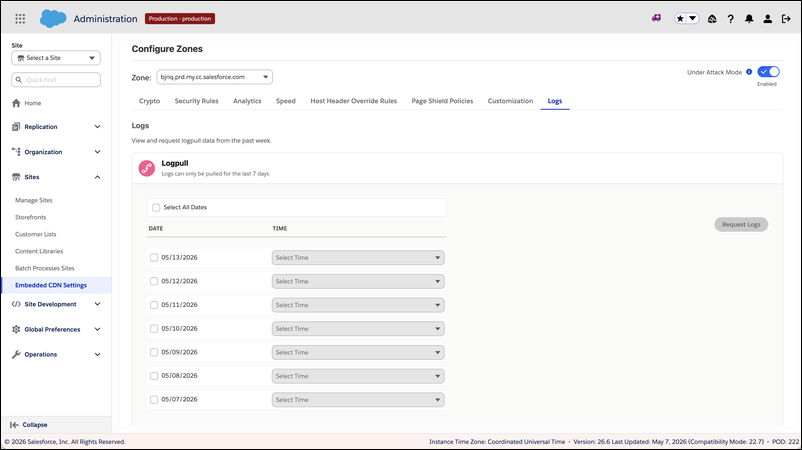
The Logs tab is split into two sections.
- Logpush: Continuously stream eCDN logs to a customer-owned destination. Logpush jobs deliver logs on a schedule, and each zone supports up to 2 active Logpush jobs, one per dataset.
- Logpull: Download recent eCDN request logs on demand. Logpull retains logs for 7 days.
Supported Destinations and Datasets
Logpush delivers to these destinations.
- Amazon S3: Push logs as gzip-compressed batches to an S3 bucket.
- Google Cloud Storage: Push logs to a GCS bucket.
- Azure Blob Storage: Push logs to an Azure storage container.
- Datadog: Stream logs directly to a Datadog site.
- Splunk: Stream logs to a Splunk HEC (HTTP Event Collector) endpoint.
Logpush supports these datasets.
- HTTP Requests: Edge HTTP request log records.
- Firewall Events: Security events evaluated by WAF, rate limiting, and managed rules.
- Page Shield Events: Page Shield script and connection events.
For the fields each destination type requires, see eCDN Logpush Destination Settings.
Configure Logging for a Zone
Logging setup and management are covered in these tasks.
For the other controls on the Configure Zone screen, see eCDN Zone Settings in Business Manager.
The Logs Tab Isn't Showing
Note If you don't see the Logs tab or the Logpush section described in these guides, ask your
admin or your Salesforce representative to enable the new Configure Zone screen for your
instance.
- Create a Logpush Job
Create a Logpush job to stream eCDN request, security, and Page Shield logs from your B2C Commerce storefront continuously to a customer-owned destination. The New Logpush Job wizard walks through destination setup and job configuration in two steps. - Manage Logpush Jobs
Pause, edit, or delete the eCDN Logpush jobs configured for a zone on your B2C Commerce storefront. The Logpush table on the Logs tab lists every job configured for the zone, with a header counter such as Logpush (2) and You have used 2 out of 2 Logpush jobs. - Download Logs with Logpull
Use Logpull to download recent eCDN request logs for a zone on your B2C Commerce storefront on demand. Logs are available for the past 7 days only. - eCDN Logpush Destination Settings
Required and optional fields for each eCDN Logpush destination type on your B2C Commerce storefront: Amazon S3, Google Cloud Storage, Azure Blob Storage, Datadog, and Splunk.