
Add an eCDN managed SSL certificate to a hostname for a zone, validate it, and map DNS so the hostname's traffic routes to its zone. eCDN managed certificates are issued and auto-renewed by Salesforce.

Which Salesforce Commerce Product Do I Have?
For the DNS mapping rules, validation methods, and certificate limits, see DNS Mapping for eCDN Zones.
To add an eCDN managed certificate with the CDN Zones API instead, see eCDN Automatic Certificates in the developer documentation.
-
Click App Launcher
 , and then select .
- Click Certificates or Settings for the zone to which you're adding a certificate.
- On the Crypto tab, select the zone from the list.
- Click New Certificate.
-
Select eCDN Managed Certificate.
An eCDN managed certificate uses the automatic certificate type: Salesforce issues and renews it for you.
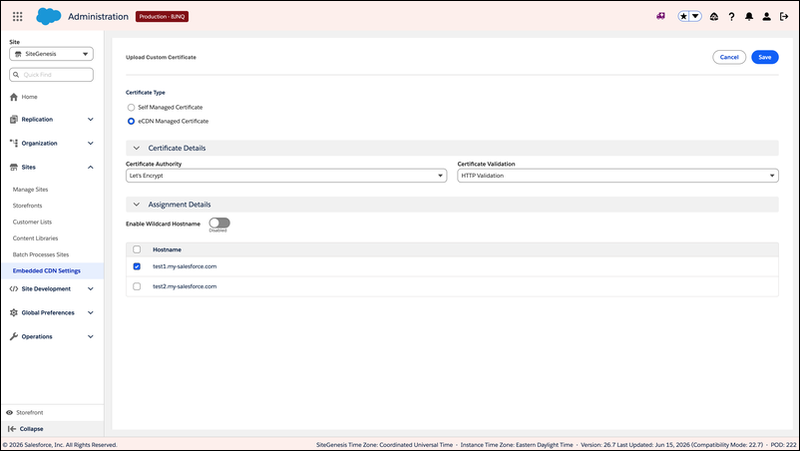
- From the SSL Certificate Authority dropdown, select Lets Encrypt or Google (recommended).
-
From the SSL Certificate Validation Method dropdown, select HTTP
Validation or TXT validation.
Choose HTTP validation without a stacked CDN, or TXT validation with a stacked CDN and DCV delegation. For the details and requirements of each method, see DNS Mapping for eCDN Zones.
- Select the hostname to which you want to assign the SSL certificate.
- Click Upload Certificate.
-
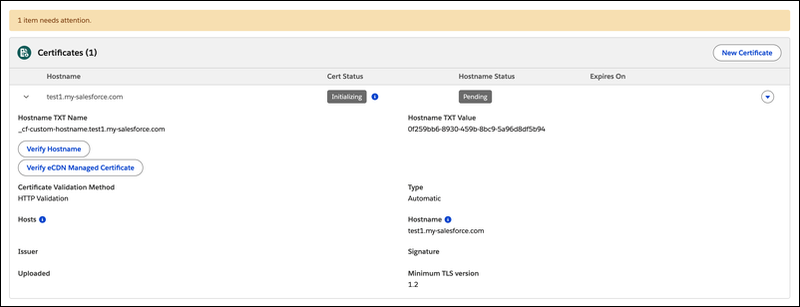
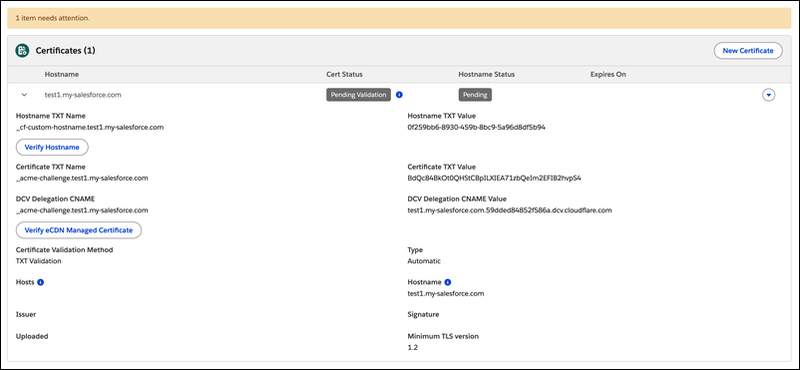
Copy the displayed verification text into your own DNS portal.
-
HTTP validation: Copy the displayed hostname verification text.
-
TXT validation: Copy the displayed certificate and hostname TXT verification text, including the DCV Delegation CNAME.
-
-
To check the status of hostname validation, click Verify
HostName.
Verification can take up to six hours.
-
(TXT validation only) After the hostname is active, click Verify eCDN
Managed Certificate to validate the certificate through the TXT record.
Verification can take up to six hours.
-
Map DNS so that the hostname's traffic routes to its zone.
See Map DNS to an eCDN Zone. After the CNAME points traffic to the new zone, click Verify eCDN Managed Certificate to check the certificate validation status.