
Unlock Self-Service Analysis and Data Exploration in Your Tableau Next Exploratory Org
An Exploratory org is your own dedicated space designed primarily for self-service analysis and exploration. You’re able to freely combine production data with your datasets and create content without affecting the production environment.
Required Editions
| View supported editions. |
Build Your Analysis in the Exploratory Org
Your Exploratory org gives you the autonomy to build and refine your work on your own terms. After your analysis is complete and ready for review, you can share it with analysts for feedback before it’s considered for broader consumption.
| Feature | Details |
|---|---|
| Combine Data | Connect production data with data, such as a local spreadsheet or a specialized dataset, to create models and visualizations. This process enables you to work with both governed and individual data sources in a safe, contained space. |
| Build and Explore | All of your work remains local in your Exploratory org. This isolation enables you to freely test new ideas and make revisions without affecting the governed content used by others. You can develop your analysis iteratively, knowing that your progress is secure and separate from production data, models, and dashboards. |
| Work Autonomously | Working in an Exploratory org keeps in-progress work from disrupting the production environment. This separation preserves system integrity until changes undergo promotion and approval. |
Review Your Exploratory Org
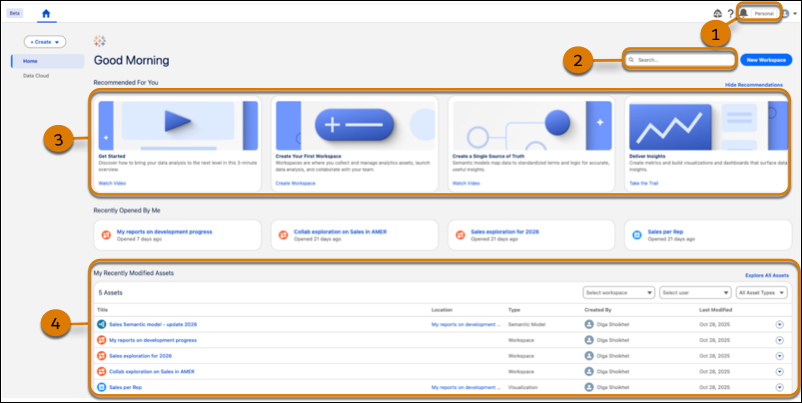
Use the org picker (1) to confirm your current environment. Use search (2) to locate assets, and recommendation cards (3) are available to guide your first steps. For quick access, recently opened and modified assets (4) are at the bottom of the page.
Request an Exploratory Org
To begin your independent data exploration and analysis, contact your Tableau Next admin to request an Exploratory org. Look for an email with access instructions after your org is ready.
- Access Your Exploratory Org
You can easily switch from your production environment to your Exploratory org, even though it's a separate environment, without needing to log in again. - Reuse Production Org Assets
Your Exploratory org provides the flexibility to integrate and experiment with data sources (DMOs), visualizations, and semantic models to create comprehensive views for analysis. - Share Assets from an Exploratory Org
Foster a collaborative environment for data exploration and analysis by sharing assets organized in workspaces. Sharing enables colleagues to view, interact with, and contribute to the content you create. - Promote Exploratory Org Workspace Assets to Production
Promote work to the production org without manual handoffs. Built-in dependency checks and contextual notes help admins approve requests. Real-time Task Manager updates keep promotion workflows transparent and trackable from start to finish. - Exploratory Org Considerations
You have complete control over all assets that you create in your Exploratory org. However, access to reused assets is governed by existing access policies and settings.