When actions are enabled for a visualization, you can click on a record field to view the available actions.
Required Editions
| View supported editions. |
You can take actions on any record field with a blue label in the visualization. Click the label and then select an action from the menu.
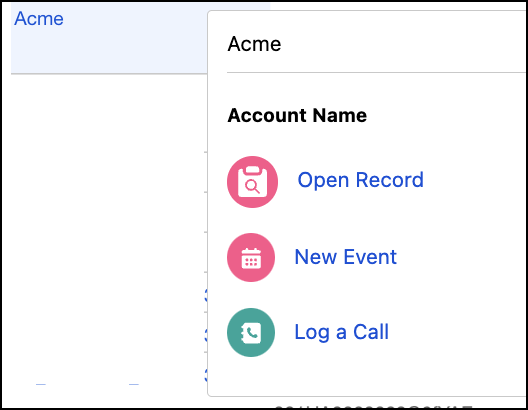
The action menu can include:
- URL navigation to Salesforce pages and external websites.
- Object-specific actions and global actions to create, update, and interact with Salesforce records. For example, you can open records, create cases, update accounts, and post to Chatter.
The action list is specified by the visualization creator. Only actions that accessible for the current page layout and user permissions are visible. In Summer '25, the list of available actions is limited to 5 actions.

Note A Tableau Next user sees only the Salesforce actions that you add to a visualization and
that are available on the source object's Salesforce page layout. If an expected action
doesn't appear or is unavailable, verify that it's included in the Salesforce Mobile and
Lightning Experience Actions section of the page layout and that the user has the required
permissions.
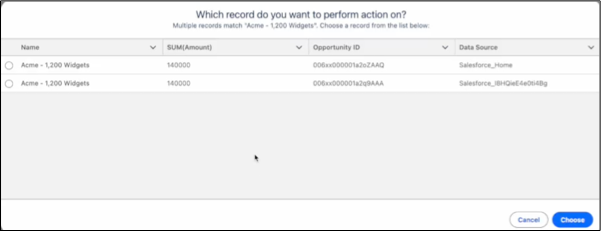
The Open Record action is designed for multi-org environments. When records with identical names exist across different data sources, select the record you want to access, opening it in the corresponding source org.