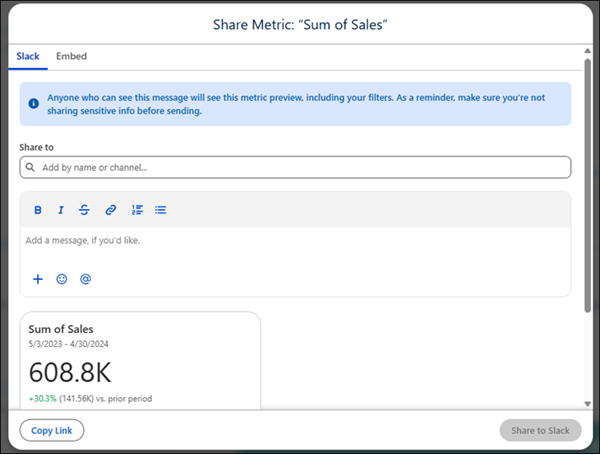
When you send previews of Tableau Next metrics, dashboards, and visualizations (vizzes)
in Slack, anyone who can see the message will see the preview, including any filters applied.
Before sending, make sure you’re not sharing sensitive data.
Required Editions
| User Permissions Needed |
| To share metrics, dashboards, and vizzes in Slack: |
Tableau Unmetered Consumer or Tableau Next Consumer or Tableau Unmetered Self-Service Consumer or Tableau Next Self-Service Consumer
permission set |
Send a preview from Tableau Next directly to Slack:
-
From Tableau Next, click the dropdown arrow on a metric, dashboard, or viz, and choose
Share. Or from a metric, dashboard, or viz's page, click
Share.
-
On the Share to Slack tab, type the names of people or channels that
you want to send the preview to.
-
Type your message.
-
Click Share to Slack.
You can also copy a link to a metric, dashboard, or viz from Tableau Next, and paste the link
in a Slack message. Then, wait a moment for the preview to unfurl, write your message, and
select Send. If you want to remove the preview, click the X on the upper
right corner of the preview in the message composer window in Slack.