
The Tableau Next analytics home page offers a quick way to build analytics assets, organize them within workspaces and access the resources and assets available to you.
Required Editions
| View supported editions. |
After enabling Tableau Next for your organization, you can open it from the App Launcher.
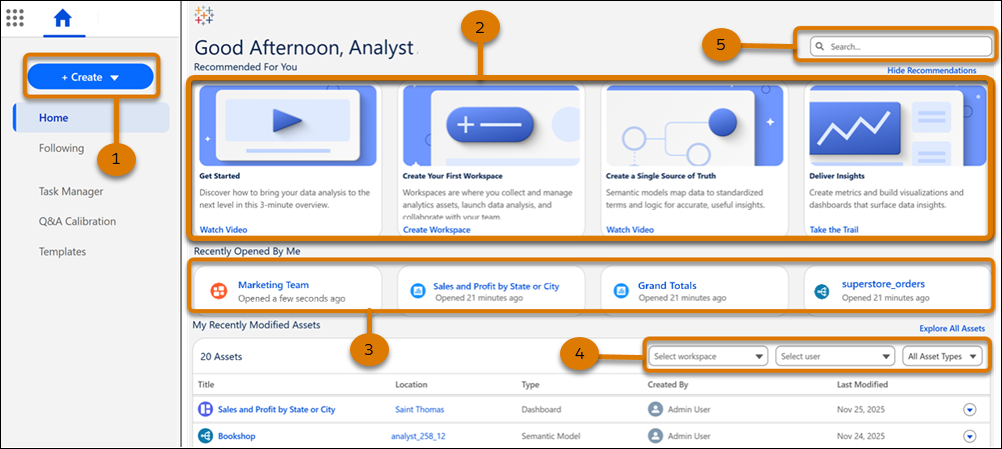
Create workspaces and other assets in just a few clicks (1). Review a curated list of resources, such as videos and Trailhead modules, to familiarize yourself with Tableau Next (2). Resume working on the assets you, as the logged-in user, opened most recently from the top of the home page (3). The Explore section lists assets based on these filters: workspace, user, and asset type (4). You can also search for your assets by entering a keyword (5).
To take action on an asset quickly, use its context menu. For example, to view an asset, click Open.
- Tableau Next Workspaces
A workspace is a flexible place for analysts to create, add, and reuse analytic assets to answer questions about their data. - Unlock Self-Service Analysis and Data Exploration in Your Tableau Next Exploratory Org
An Exploratory org is your own dedicated space designed primarily for self-service analysis and exploration. You’re able to freely combine production data with your datasets and create content without affecting the production environment.