
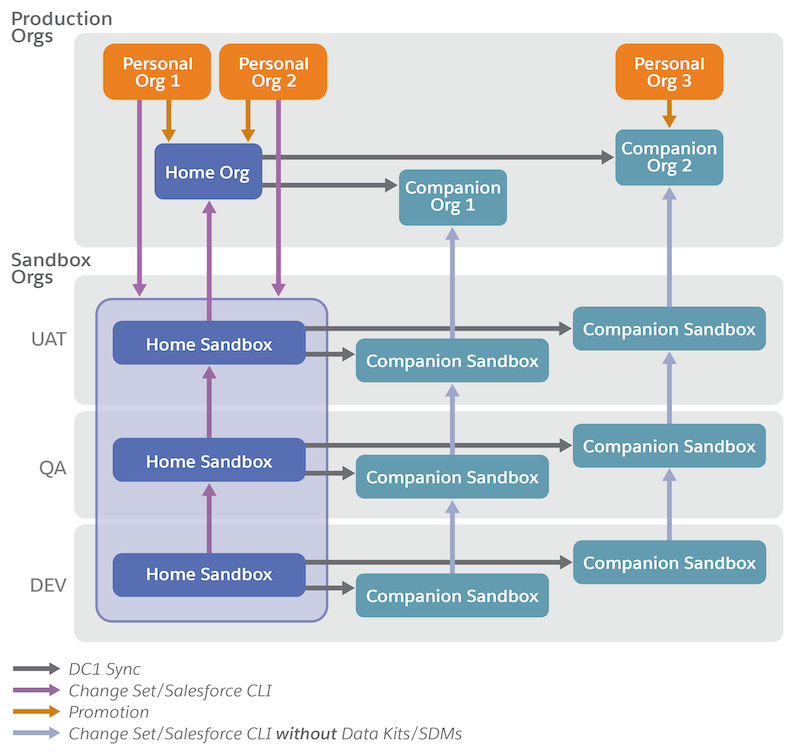
Deploy Tableau Next workspaces, visualizations, and dashboards from your sandbox org to other sandbox orgs and your production Data 360 home and companion orgs using change sets. You can also deploy Tableau Next and Data 360 assets from sandbox to production home orgs using data kits. Using sandboxes allows you to develop, test, and train without compromising the data and apps in your production org. Using change sets and data kits for deployments moves the customizations you created and tested in your sandbox directly to your production org.
Required Editions
| View supported editions. |
| Home Sandbox Orgs | Companion Sandbox Orgs | |
|---|---|---|
| Deployment Options for Tableau Next Assets |
Use Metadata API capabilities such as change sets or Salesforce CLI OR Add assets in a data kit |
Use Metadata API capabilities such as change sets or Salesforce CLI |
| Deployment Options for Semantic Models and Other Data 360 Assets | Use Metadata API capabilities such as change sets or Salesforce CLI | Sync Data 360 assets from the home org |
You can also deploy Tableau Next assets using other standard Metadata API tools, like the Salesforce CLI. For more information on developer tools, see the Tableau Next ISV/Developer Guide.
Tableau Next in a Sandbox
A sandbox is a copy of your Salesforce org that you can use for development, testing, and training without compromising the data and apps in your production org. Tableau Next sandboxes are the same as Data 360 sandboxes. Data 360 sandboxes contain only metadata. No data is replicated when you provision Data 360 in a sandbox, even in partial copy and full copy sandboxes.
Use a sandbox to:
- Test changes against copies of your production data and users.
- Provide a training environment.
- Test AppExchange packages or integrations.
- Isolate customization and development work from your production environment until you’re ready to deploy changes.
For more information, see Data 360 in a Sandbox Org.
To create a sandbox with Tableau Next, follow the steps on Create a Data 360 Sandbox. Then, enable Tableau Next and create your analytics assets in the sandbox.
Deployment Considerations for Change Sets and Data Kits
Most Tableau Next workspaces, visualizations, and dashboards depend on semantic models for their data. You can’t deploy semantic models and Tableau Next assets in a single change list. You must deploy semantic models using data kits.
Data 360 companion orgs don’t support data kits, meaning you can only deploy semantic models and other Data 360 assets to home orgs. To deploy Tableau Next assets in a companion org, first deploy your semantic models to your home org. Next, validate that the home org syncs the semantic models to the companion orgs. Then, deploy your Tableau Next assets to the companion orgs using a change set.
You can’t deploy data kits containing Tableau Next assets from on a higher major release version, such as preview sandboxes, to target orgs (production or non-preview sandbox) on a lower major release version. Make sure that your sandbox org is on the same release version as your target org before creating the data kit.
- You can deploy within the same major release from a lower minor version to a higher minor version.
- You can deploy within the same major release from a higher minor version to a lower minor version.
- You can deploy from a lower major release to a higher major release, which supports backward compatibility and automated upgrade processes.
- You can’t deploy from a higher major release to a lower major release.
For more information about sandbox previews, see What are Preview and Non-Preview Sandboxes? and Salesforce Sandbox Preview Instructions.
- Deploy Tableau Next Assets with Change Sets
Deploy your Tableau Next workspaces, visualizations, and dashboards using an outbound change set to your target home and companion orgs. - Deploy Tableau Next Assets in a Data Kit
Deploy your Tableau Next workspaces, visualizations, and dashboards to your target home org with a data kit. Data 360 semantic models, the primary data source for Tableau Next assets, must be deployed to target home orgs using data kits. - Add and Deploy Verified Queries with a Tableau Next Data Kit
Add verified queries to a Tableau Next data kit, deploy the kit with the semantic model, and confirm each question's status in the target org.