The Tableau Next Top Open Opportunities visualization template provides instant insights
for sales managers to review and track top open opportunities. This visualization uses the data
from the Sales Insights semantic model. Designed to allow analysts to visualize their data
instantly and provide stakeholders with actionable insights, bypassing the time-consuming process
of manual configuration and complex data modeling.
Required Editions
| User Permissions
Needed |
| To view Marketplace templates: |
Tableau Unmetered Platform Analyst or Tableau Next Platform Analyst permission set |
| To install semantic models in Data 360: |
Data Cloud Architect permission set |
| To install and view Sales Insights: |
Sales Insights user permission |
This template requires:
- Customer 360 Data Model installed in Data 360
- Sales Insights data kit installed in Data 360
- Sales DMOs: Account, Lead, Opportunity, Opportunity History, Opportunity Stage, Task,
User, User Role, Contact Point Address, Business Period, Calendar Event, Forecasting Fact, and Forecasting Item.
This template is designed to work with the Sales Insights DMOs, mapping your sales data directly into this visualization.
-
On the Tableau Next home page, select Marketplace.
-
In the Search box, enter Top, and select the Top Open Opportunities tile.
-
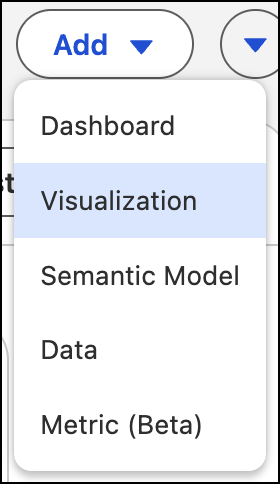
Or, from a workspace, click Add, and select
Visualization.
-
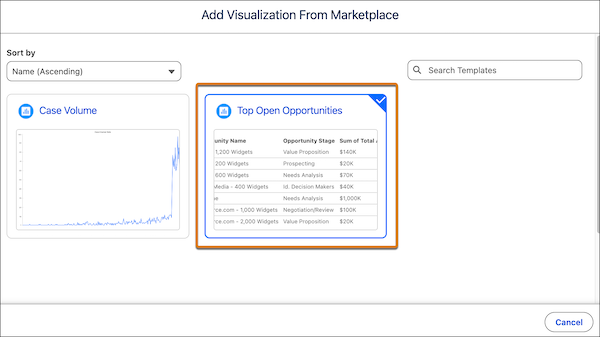
To view visualization templates, select From Marketplace.
-
Select the Top Open Opportunities template tile and click
Next.
-
View the template details and click Next.
-
Select the data space for the semantic model.
-
Click Next to start the installation process.
The template checks your org to make sure that all prerequisites and permissions are set up correctly to install the visualization. If the template validation is successful,
the installation process begins. If it fails, you’re provided with a list of errors to resolve.