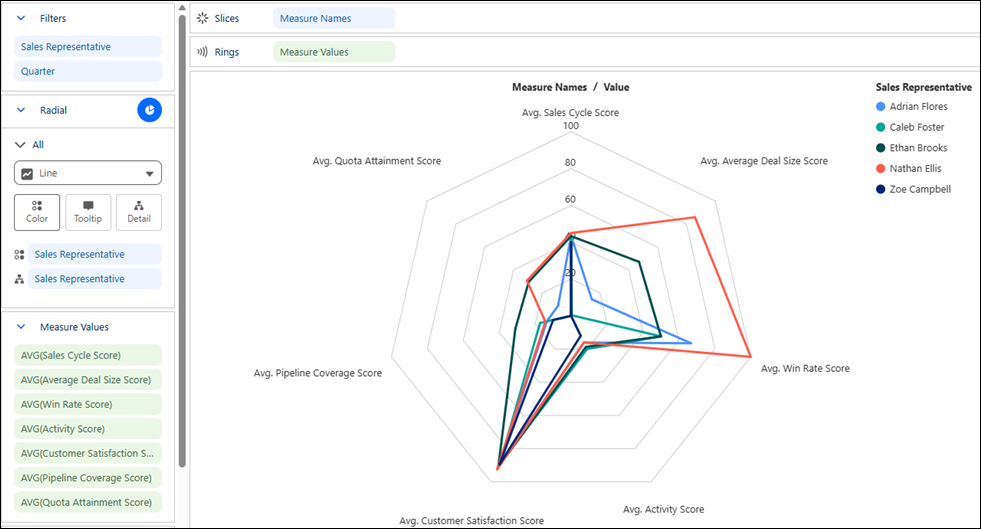
Compare entities across multiple measures with radar charts in Tableau Next. Evaluate
results side by side to quickly identify strengths, weaknesses, and overall performance patterns
using their distinctive shapes. For example, compare sales representatives across measures such
as quota attainment, win rate, and customer satisfaction scores.
Required Editions
| User Permissions Needed |
| To create Tableau Next visualizations: |
Tableau Unmetered Platform Analyst or Tableau Next Platform Analyst permission set |
-
From the Show Me pane in your visualization, click the
 thumbnail. The layout changes to Radar, and the pane shows the required fields and
supported field encodings for the chart type.
thumbnail. The layout changes to Radar, and the pane shows the required fields and
supported field encodings for the chart type.
-
From the Data pane in your visualization, drag the measures that you want to compare to the
Measure Values section. For the chart in this example, select fields,
such as Sales Cycle Score, Average Deal Size
Score, and Win Rate Score.
-
Drag the dimension that identifies the entities you want to compare, such as
Sales Representative, onto Color.
-
Optionally, drag a measure onto KPI to highlight its value in the
center of the chart.
-
You can further customize the visualization with labels or tooltips to make the chart
easier to interpret.
-
Save your visualization.