Example of Report Charts on an Account
Page
In this example, we've embedded two report charts on an
important account page that show deals in the pipeline and open support
cases for the account. From looking at the charts, the account executive
can quickly gauge the account’s activity and health.
Required Editions
| Available in: Salesforce Classic and
Lightning Experience |
| Available in: Essentials, Group, Professional, Enterprise,
Performance, Unlimited, and Developer Editions
|
| Available in: Enhanced Folder Sharing |
| User Permissions Needed |
| To create, edit, and delete reports: |
- Enhanced Folder Sharing
- Create and Customize Reports
AND
Report Builder
|
Report Charts on an Account Page
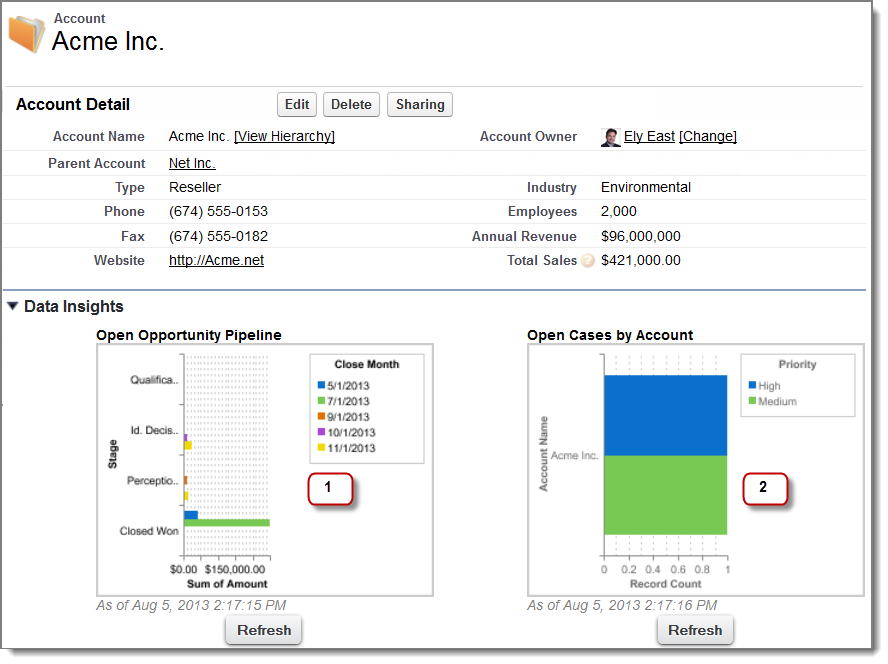
- The pipeline chart shows opportunities for the account in various stages including two that were
won. The account executive can hover on the chart to get the value of each opportunity (Values
are highlighted if the source report chart has hover enabled). She’s able to click the chart,
go to the report, and get more details for these opportunities.
-
From the charts on open cases, she can see there are a couple
of unresolved support issues for the account. She can click the chart,
drill into the report for case details and follow up with the support
engineers to get them resolved before a crucial meeting with the client.
