Report on Chatter Top 100 Feed Item Views with Interaction Count
Report
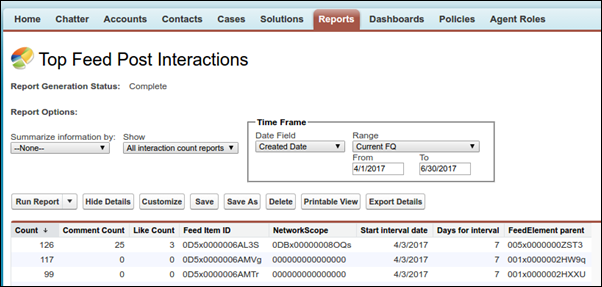
Get a report on the top 100 feed item views in your organization or community with the
primary object Interaction Count Report. Knowing the posts that people are looking at most is a
great way to get insight into current Chatter trends. Actions counted as views include liking,
commenting, and viewing a feed item detail. View counts aren’t unique. For example, a user can add
three comments to a post, and that is counted as three views. After you set up the report, it’s
run weekly.
Required Editions
| Available in: Salesforce Classic and
Lightning Experience |
| Available in: Essentials, Group, Professional, Enterprise,
Performance, Unlimited, and Developer Editions
|
| User Permissions Needed |
| To create or update custom report types: |
“Manage Custom Report Types” |
| To create a public reports folder: |
“Manage Public Reports” |
Custom report types are the only way to make reports about the 100 top feed item views. Salesforce doesn’t provide sample top view activity
reports or a standard report folder.
Primary Object for Interaction Count Report
When you create a custom report type, select Interaction Count Reports
for the Primary Object.
Available Interaction Count Report Fields
The following table lists the available fields for Interaction Count reports.
| Field |
Description |
| Comment Count |
The number of comments on a post |
| Count |
The number of views on a post |
| Days for interval |
How often the report is run—currently 7, for every seven days (fixed
value) |
| FeedElement parent |
The ID of the group, profile, record, or other entity that is the parent to the feed
where the content is posted |
| Feed Item ID |
The ID of the post |
| Like Count |
The number of likes on the post |
| NetworkScope |
The scope of the network where this feed item is available.
This field always has a
value. For the default network, it’s 00000000000000. If it’s posted in a community, it has
the ID of the community (also known as the NetworkId). If the value contains an "I," the
post is parented by a record, like an account, an opportunity, or some other record
type.
|
| Start interval Date |
The date that marks the start of the seven-day run interval |

