
Report builder is a visual editor for reports. The report builder screen lets you work with report fields and filters, and shows you a preview of your report with just some of the data.
Required Editions
| Available in: Salesforce Classic |
| Available in: Group, Professional, Enterprise, Performance, Unlimited, and Developer Editions |
| Available in: Enhanced Folder Sharing |
To optimize screen real estate, report builder uses a compressed page header. To view your application tabs, simply close the builder or click the Salesforce logo.
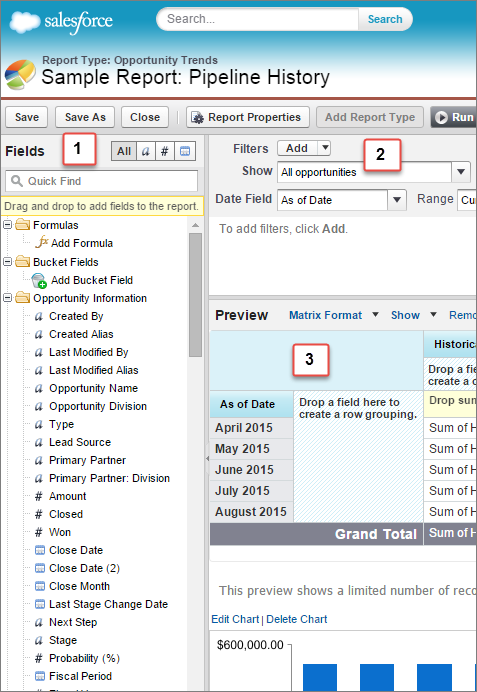
- Fields Pane (1): Find the fields you want using the Quick Find search box and field type
filters, then drag them into the Preview pane to add them to the report. You can create,
view, edit, and delete custom summary formulas and bucket fields in the Fields pane as
well.
In the joined report format, the Fields pane displays fields from all report types added to the report, organized by report type.
- Filters Pane (2): Set the view, time frame, and custom filters to limit the data shown in the report.
- Preview Pane (3): The dynamic preview makes it easy for you to customize your report. Add, reorder, and remove columns, summary fields, formulas, groupings, and blocks. Change the report format and display options, or add a chart. The preview shows only a limited number of records. Run the report to see all your results.
Watch a Demo:  Getting Started with Report Builder
(Salesforce Classic)
Getting Started with Report Builder
(Salesforce Classic)