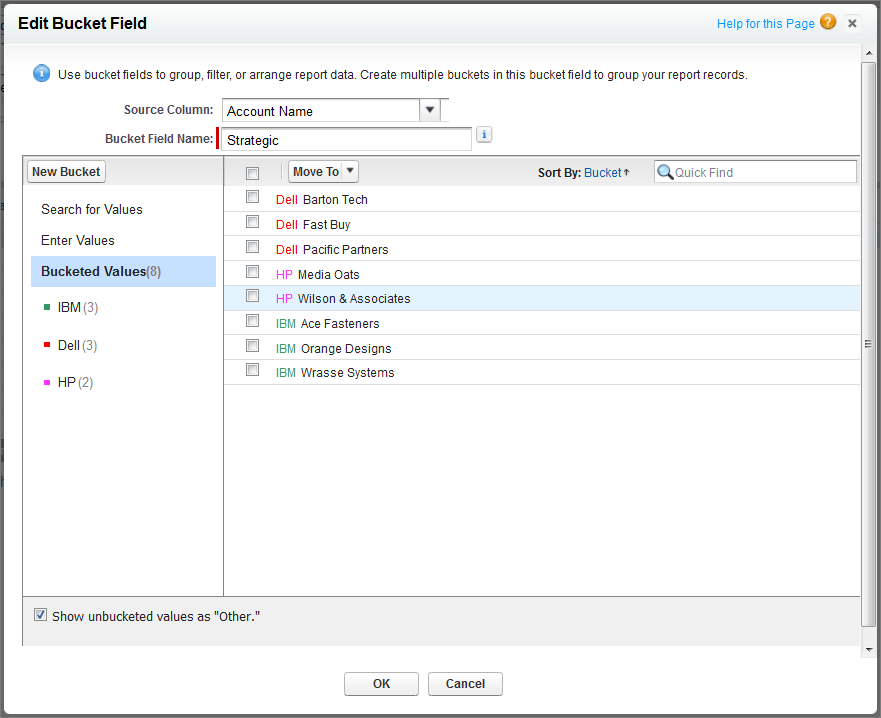
Use a text bucket to sort accounts into general categories
that you can act on.
Required Editions
| Available in: Salesforce Classic and
Lightning Experience |
| Available in: Enterprise, Performance, Unlimited, and
Developer Editions
|
| Available in: Enhanced Folder Sharing and Legacy Folder Sharing |
| User Permissions Needed |
| To create, edit, and delete reports: |
- Legacy Folder Sharing
- Create and Customize Reports
AND
Report Builder
- Enhanced Folder Sharing
- Create and Customize Reports
AND
Report Builder
|
-
Create or edit a standard account report, making sure at
least a few records appear in the report.
-
In the Fields pane of the report builder, double-click Add Bucket Field or drag it into the report.
-
For Source Column, select Account Name.
-
For Bucket Field Name, enter Strategic.
-
Click New Bucket and name the bucket IBM.
-
Click New Bucket and name the bucket Dell.
-
Click New Bucket and name the bucket HP.
-
To show the available values, leave the Search
for values... box empty and click Search.
-
Select values and drag them into the appropriate buckets.
-
Enable Show unbucketed values as “Other”.
-
Click OK.