Explore data across different levels of granularity by using dimension hierarchy in your
Data 360 reports. Drill down or roll up your data structure to uncover the exact insights you
need.
Required Editions
| Available in: Lightning Experience |
| Available in: Data 360 in Developer, Enterprise, Performance, and
Unlimited Editions
|
| User Permissions Needed |
| To create, edit, and delete reports in private folders: |
Create and Customize Reports |
| To create, edit, and delete reports in public and private folders: |
Report Builder (Lightning Experience) |
-
Create a Data 360 report based on a semantic model, and open the report in edit
mode.
-
In the Fields panel, search for the dimension hierarchy field and drag it into the Group
Rows section.
-
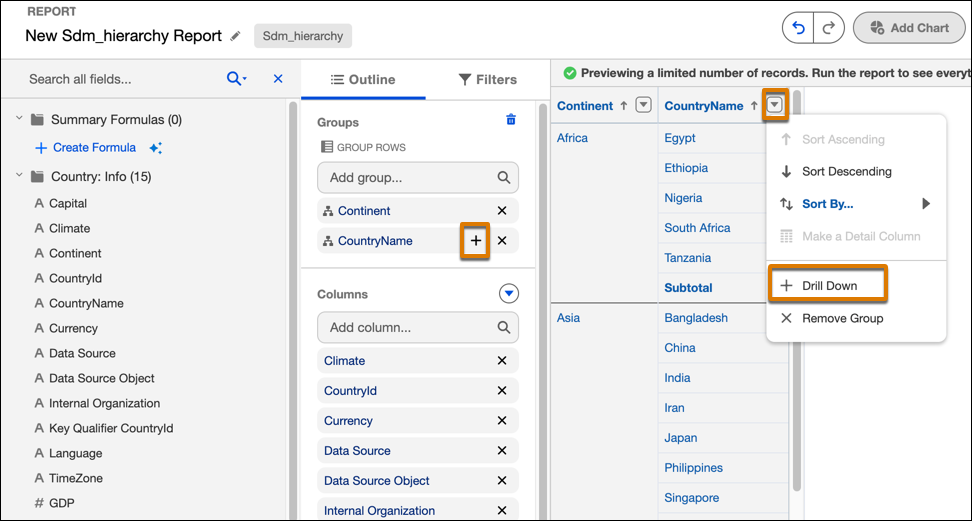
To drill down and display the next level in the hierarchy, click +
next to the dimension hierarchy field, or select Drill Down from the
column actions menu. For example, you can drill down from year to quarter, quarter to month,
and month to day.
-
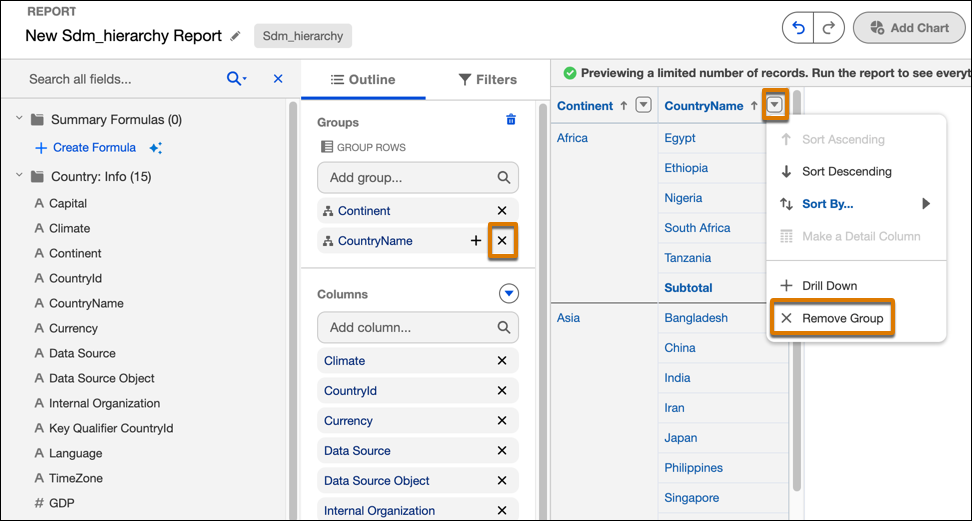
To roll up to the top level of the hierarchy, click X next to the to
the dimension hierarchy field or select Remove Group from the column
actions menu.