
If you don’t have Salesforce Forecasting enabled, you must add quota data to your app. Without quota data, the Team Performance charts can’t provide an accurate visualization of performance metrics.
Required Editions
| Available with CRM Analytics, which is available for an extra cost in Enterprise, Performance, and Unlimited Editions. Also available in Developer Edition. Requires a CRM Analytics Plus license. |
| Permission Sets Needed | |
|---|---|
| To create and manage the Revenue Operations Analytics app: | CRM Analytics Plus Admin permission set |
| To use the Revenue Operations Analytics app: | CRM Analytics Plus User permission set |
Your quota data must be in a CSV file and contain these fields in this order.
- StartDate (yyyy-mm-dd format)
- QuotaAmount
- OwnerName
- Username
For an example, see Sales Analytics Example .CSV File.
- From the Analytics tab or Analytics Studio, click Browse and find the Quota dataset.
- In the Quota dataset dropdown menu, select Edit.
-
In the upper-right corner, click the replace data
 icon.
icon.
- Locate the CSV file.
- Click Next.
-
If your fiscal period starts on a date other than January 1, update the Quota Metadata
file.
- Copy the JSON from Sales Analytics Quota Dataset JSON File and paste it into a text editor.
-
Change the value of
"fiscalMonthOffset"from 4 to a number that represents the month that your fiscal period starts, where “0” indicates January, “1” February, and so on, up to “11” for December. - Save the file.
- On the Replace Dataset Data page, locate the Data Schema File area.
- Click the arrow next to the Quota .JSON file, select Replace File, find the file that you saved and upload it.
- On the Replace Dataset Data page, click Next.
-
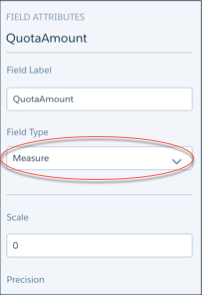
Select the first column —QuotaAmount— and in the Field Attributes panel
on the right, set Field Type to Measure.
- Upload your CSV file with the quota data.
-
Rerun the dataflow to update the dashboards.
- In Data Manager, click Dataflows & Recipes and find your app’s dataflow.
- In the app dataflow’s dropdown menu, click Run now.