Set Up Public Sector Case Analytics CSAT Metrics: Example
This scenario provides detail to help you answer questions about CSAT data in Step 6 of the Public Sector Case Analytics configuration wizard.
If you track customer satisfaction (CSAT) data, such as the CSAT score for a service case, in an object other than Cases, take particular care in how you answer the questions on this page.
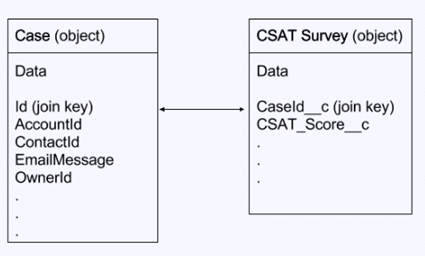
For example, if you store the CSAT score in a custom object, for example "CSAT Survey", select this object in question 1. In Question 2, specify the field that has the CSAT metric you would like to report, for example "CSAT Score." Public Sector Case Analytics needs to relate the custom object specified in Question 1 to the Cases object so dashboards can include data about cases, accounts, and agents by CSAT. This relationship is created through a join.
To specify the relationship between the Cases object and your custom CSAT object, designate
join keys from both objects and enter their API names in Questions 3 and 4. On the Cases object,
this will typically be the "Id" field. On the example custom object "CSAT Survey," this is the
custom field that stores the case ID, which in this scenario is the field with the API name
CaseId__c.
The following diagram shows the join between the two objects.