
The Home embedded dashboard includes pipeline metrics, call reports (including any interactions between internal or external deal parties), and account insights.
Use the Dashboard
Use the Home Embedded dashboard for a comprehensive view of your deals, activities, and accounts.
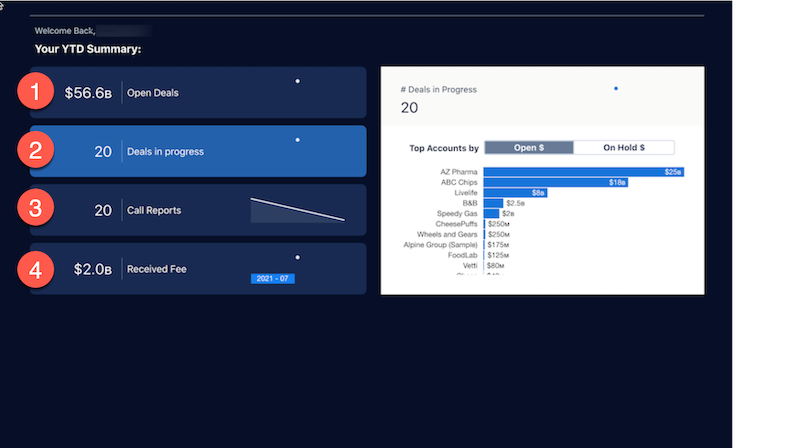
Click the fields on the left to populate the charts on the right. Click (1) Open Deals to understand your open pipeline. Click (2) Deals in progress to understand which deals to focus on. Click (3) Call Reports to see overall client engagement and progress. Click (4) Received Fee to understand expected vs. received fees over time.
KPI Calculations - Open Deals
- Open Deals: Sum of Transaction Value from Financial Deal object where Deal status is in ["On Hold", "Open"].
- Open Deals Over time: Sum of Transaction Value from Financial Deal object where Deal status is "Open" over time(Snapshot Date) for Current Year until Current Day.
- Open Deals by stage: Sum of Transaction Value from Financial Deal object where Deal status is "Open" by Stage.
KPI Calculations - Deals in Progress
- Deals in progress: Count of Deals from Financial Deal Object where status is in ["On Hold", "Open"].
- Deals in progress over time: Sum of TransactionValue from Financial Deal Object where status is in ["On Hold", "Open"] over time (Snapshot Date) for YTD.
- Top Accounts: Sum of Transaction from Financial Deal Object grouped by Accounts toggled by Open and on Hold stages.
KPI Calculations - Call Reports
- # Call Reports: Count of call reports(Interaction Summary object) created in YTD.
- Call reports over time: Count of call reports created in YTD over CreatedDate.
- Call Reports Overview: Count of call reports created in YTD for Deals grouped by InteractionType.
KPI Calculations - Received Fee
- Received Fee: Sum of ReceivedFee from Financial Deal object for YTD.
- Received Fee over time: Sum of ReceivedFee from Financial Deal object where Deal status is "Open" over time(Snapshot Date) for Current Year until Current Day.
- Received Fee Donut: Received Fee/ TotalExpectedFee for YTD.
- Received Fee Timeline: Sum of Received Fee and TotalExpectedFee over time for YTD.