When you first run a recipe, Data Prep caches the input data, storing a copy of the
source data in cached files, by default. To save time during subsequent recipe runs, Data Prep
uses the cached data instead of extracting the same data again. To use input caching, the recipe
must extract data from all fields in the source.
Required Editions
| Available in Salesforce Classic and Lightning Experience. |
| Available for an extra cost in Enterprise, Performance, and
Unlimited Editions. Also available in: Developer Edition
|
When the option is enabled, recipe runtime varies based on whether the source data is cached
and the cache is used. If the recipe doesn’t extract data from all fields in the source, caching
doesn’t happen. If the data is older than 45 days, the disk usage exceeds 70%, or the source
data changed since the last recipe run, cached data isn’t used. If needed, you can disable input
caching to get more consistent recipe runtimes.
-
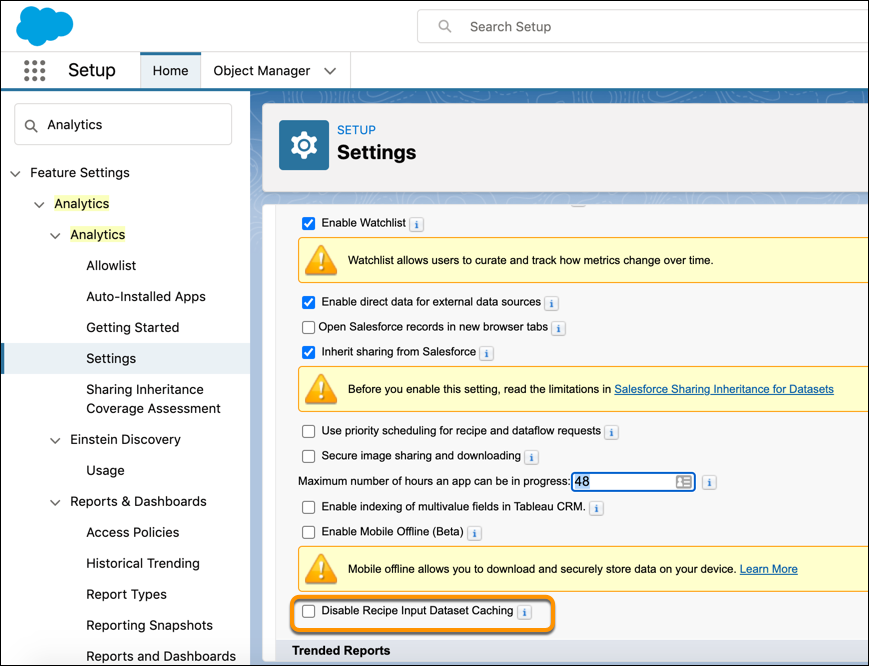
From Setup, enter Analytics in the Quick Find
box, then select Settings.
-
Select Disable Recipe Input Dataset Caching.
-
To have more consistent recipe runtimes, you can disable this option.
-
Click Save.