The CRM Analytics Learning Adventure app walks you through best practice examples for designing just the right visualizations and for building powerful dynamic apps. Hands-on examples are presented in dashboards that show you how to build dashboards. Because it's an app, you can look under the hood and see the JSON used to build each dashboard.
Required Editions
| Available in: Salesforce Classic and Lightning Experience. |
| Available for an extra cost in Enterprise, Performance, and Unlimited Editions. Also available in: Developer Edition. |
| User Permissions Needed | |
|---|---|
| To install the Learning Adventure App in CRM Analytics Studio: | Manage CRM Analytics Templated Apps |
| To access the Learning Adventure App after it’s installed: | Use CRM Analytics Templated Apps |
With the CRM Analytics Learning Adventure app, you learn as you play with example charts and dynamic visualizations. Some things you can expect to get out of this Learning Adventure:
- Learn how to choose the right visualization for your data, and your audience.
- Explore real examples of comparison, trending, relationship, composition, distribution, metrics, and location charts – see what's possible!
- Understand the power of tables and learn how to take advantage of the rich features across table types.
- Write customized queries with help from the SAQL examples.
- View the code behind dynamic visualizations (bindings) – explained in plain English! – and apply it yourself with step-by-step instructions.
If you have newly enabled CRM Analytics, the app is created for you by default. If you have already enabled CRM Analytics for your org, you can install it manually using the instructions below, or you can enable auto-installation in the Settings menu.

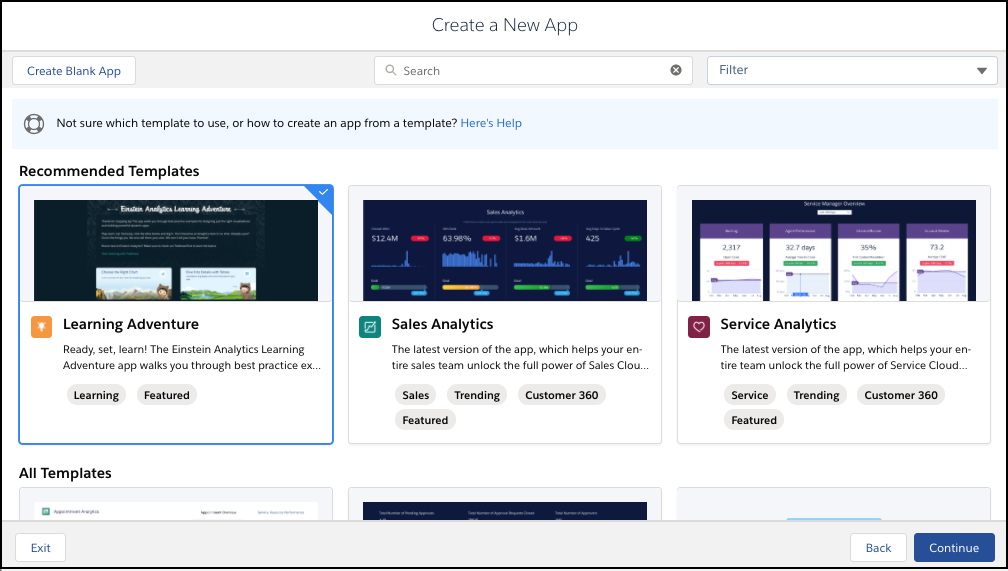
To add the Learning Adventure App to CRM Analytics Studio, click the Create button and select App. Or click Template Gallery in the left panel of the CRM Analytics Studio home page. Then in the gallery, select Learning Adventure.