
To use joins, aggregates, and sentiment detection in Data Prep, convert your dataflows to recipes. However, if your dataflow achieves your desired outcome, there’s no need to convert it, and you can continue using it. But consider using recipes for new Data Prep jobs because they offer more features.
Required Editions
| Available in: Salesforce Classic and Lightning Experience |
| Available for an additional cost in: Enterprise, Performance, and Unlimited Editions |
| Permission Sets Needed | |
|---|---|
| To convert a dataflow to a recipe: |
Edit CRM Analytics Dataflows OR Edit Dataset Recipes |
Before you convert a dataflow, keep these considerations in mind.

Warning The conversion tool doesn’t guarantee a fully automated conversion. After
conversion, identify and address issues and validate the business logic.
- Recipes don’t support some dataflow parameters or have implementation differences that require review or modification. See Dataflow Conversion Mapping.
- Conversion creates one recipe per dataflow. You can convert a dataflow multiple times. Each conversion replaces the previous recipe. If you want to keep a converted recipe, save it as a new recipe to avoid overwriting it.
- The original dataflow and its sync schedule are unchanged.
- You don’t need a dataflow to create a recipe. See Create a Recipe with Data Prep.
-
In Data Manager (Legacy), select Convert to Recipe from the
dataflow’s dropdown menu.
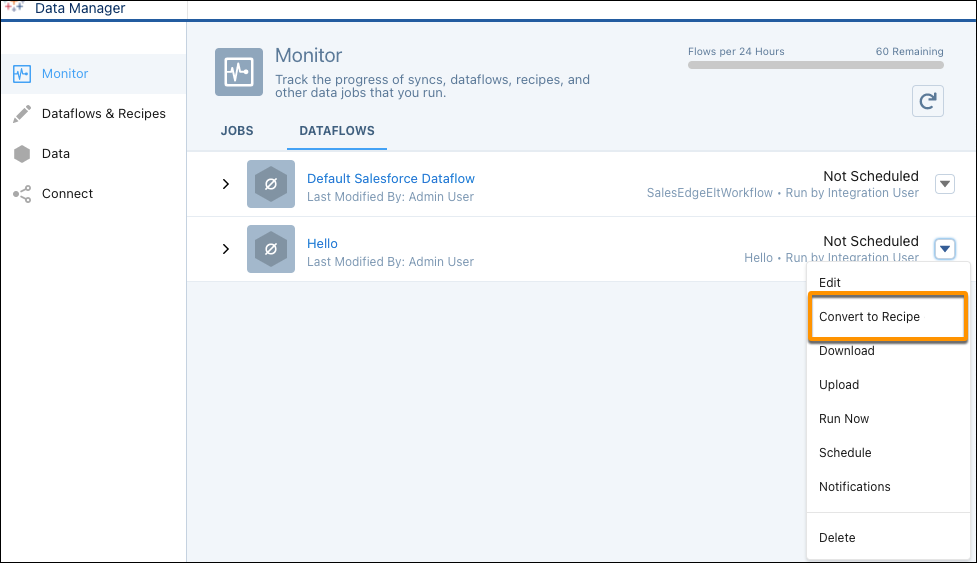 Conversion requires a valid dataflow with available input data sources. Only convert dataflows that have run successfully recently. Don’t convert an invalid dataflow.
 -
View the new recipe.
Review and address any warnings and errors, as indicated by the
 and
and  icons against nodes and in the recipe editor header.
 - Save and run the recipe.
- Compare the converted recipe’s output datasets, which have “_df2R3” appended to their names, to the dataflow’s datasets.
-
Replace the dataflow with the recipe.
- To have your dashboards and references use the recipe’s datasets, change the recipe’s output dataset API names to match the dataflow’s dataset API names. Alternatively, update your dashboards and other references to use the recipe dataset names.
- Unschedule the dataflow and schedule the recipe.
- Consider deleting the dataflow’s datasets.
- Dataflow Conversion Mapping
During conversion, dataflow functionality is mapped to similar recipe functionality. Consider the mapping specifications when evaluating the conversion of your dataflows to recipes.