A right join in CRM Analytics includes all rows from the right and only matching rows from the left (recipe data). The join includes all matched rows in the target when multiple rows match.
Required Editions
| Available in Salesforce Classic and Lightning Experience. |
| Available with CRM Analytics, which is available for an extra cost in Enterprise, Performance, and Unlimited Editions. Also available in Developer Edition. |
Example
Our company's marketing team captures demographic data in an external data source for opportunities stored in Salesforce. To help create more targeted campaigns, the team is segmenting our current opportunities by the Education Level demographic. Let’s use a right join to add the opportunity data to the demographic data.
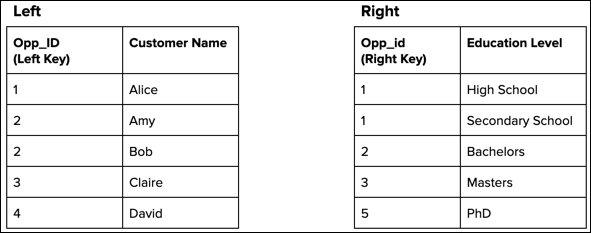
Consider the following two data streams that feed the recipe’s target dataset. To illustrate how this recipe function handles unmatched rows and duplicate keys, we included them in both data streams.
After performing the right join based on the matching keys, the recipe produces the following target dataset.
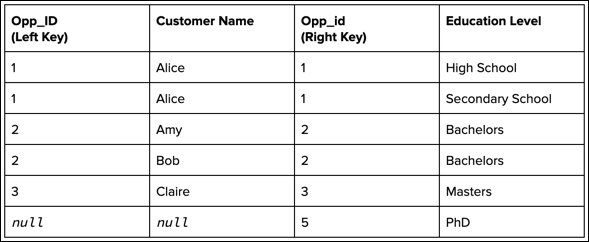
All rows from the right, including rows without a match and rows with multiple matches, are included in the target. Because Opp_id 2 has two matches on the left (Amy and Bob), the target contains a separate record for each of them. Also, because Opp_id 5 doesn’t have a match, the Opp_ID and Customer Name columns are null for that record.